Review account setup, model requirements and checks by phase.
Review GPT-6 Astra and Claude Opus 5.5 for a checkout incident.
These routes show Needs action. Prepare the review now; paid checks stay
blocked until price and account requirements are resolved.
Connect provider
Add a model
Check models
If your account is already connected, open this guide’s Add a model tab. Open Check models
to prepare the task and inspect the selected routes’ requirements.
1
Open provider setup
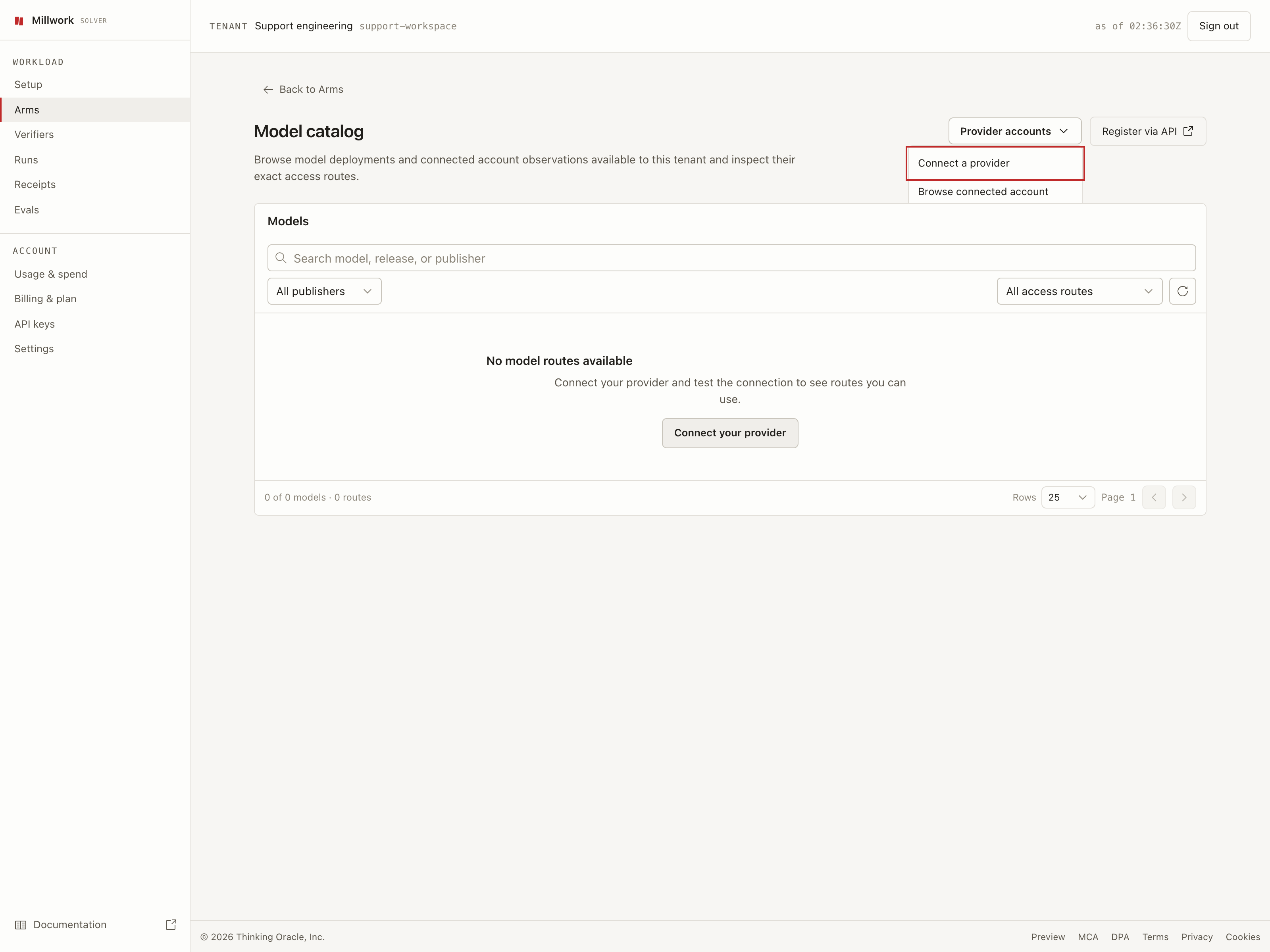
From Arms, choose Browse model catalog, then open
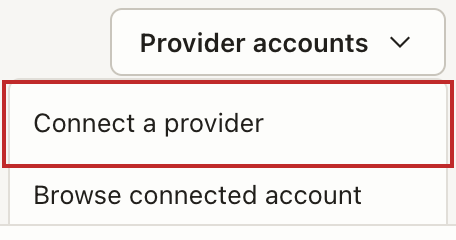
Provider accounts > Connect a provider.
Start from Provider accounts in the current model catalog.
2
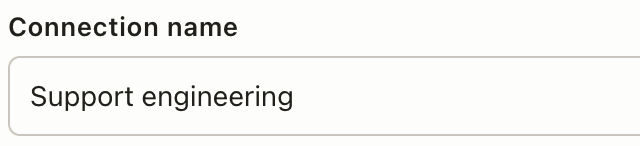
Name the connection
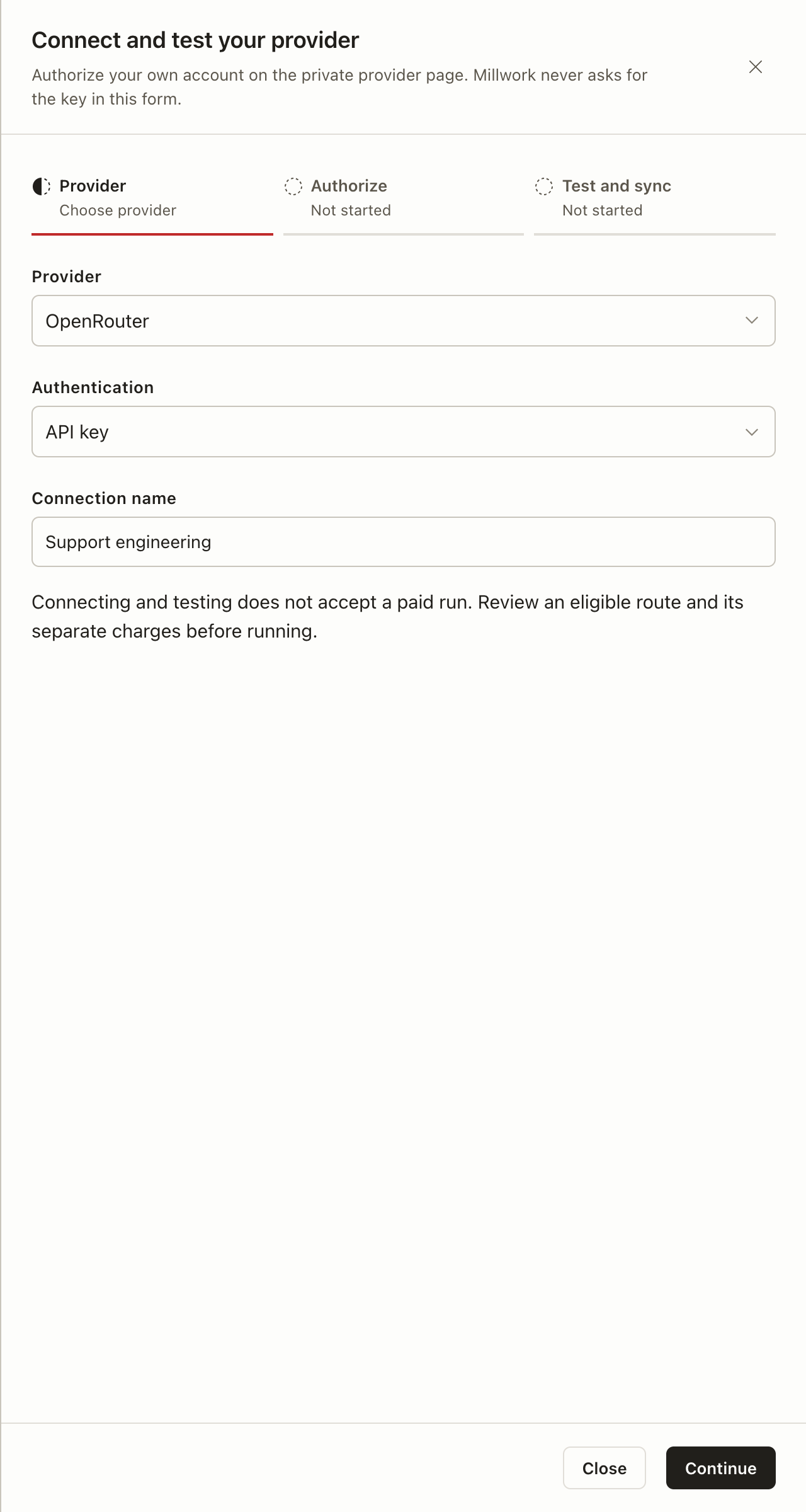
Set up the account you’ll use for both models. These field details are shown
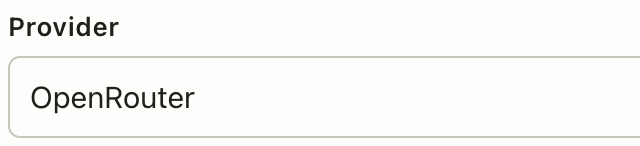
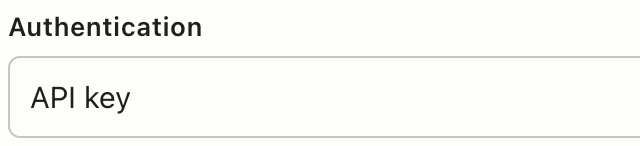
before Continue.Choose OpenRouter and keep the displayed authentication method.
Choose the provider and name the connection before continuing.
Select Continue, then Authorize. Finish on the private provider page
and return to Millwork; enter credentials only there. Use Check access,
then View model catalog after Test and sync completes.Connecting approves no paid model run and does not establish that every model
route is ready. If setup stops, continue your provider connection.
1
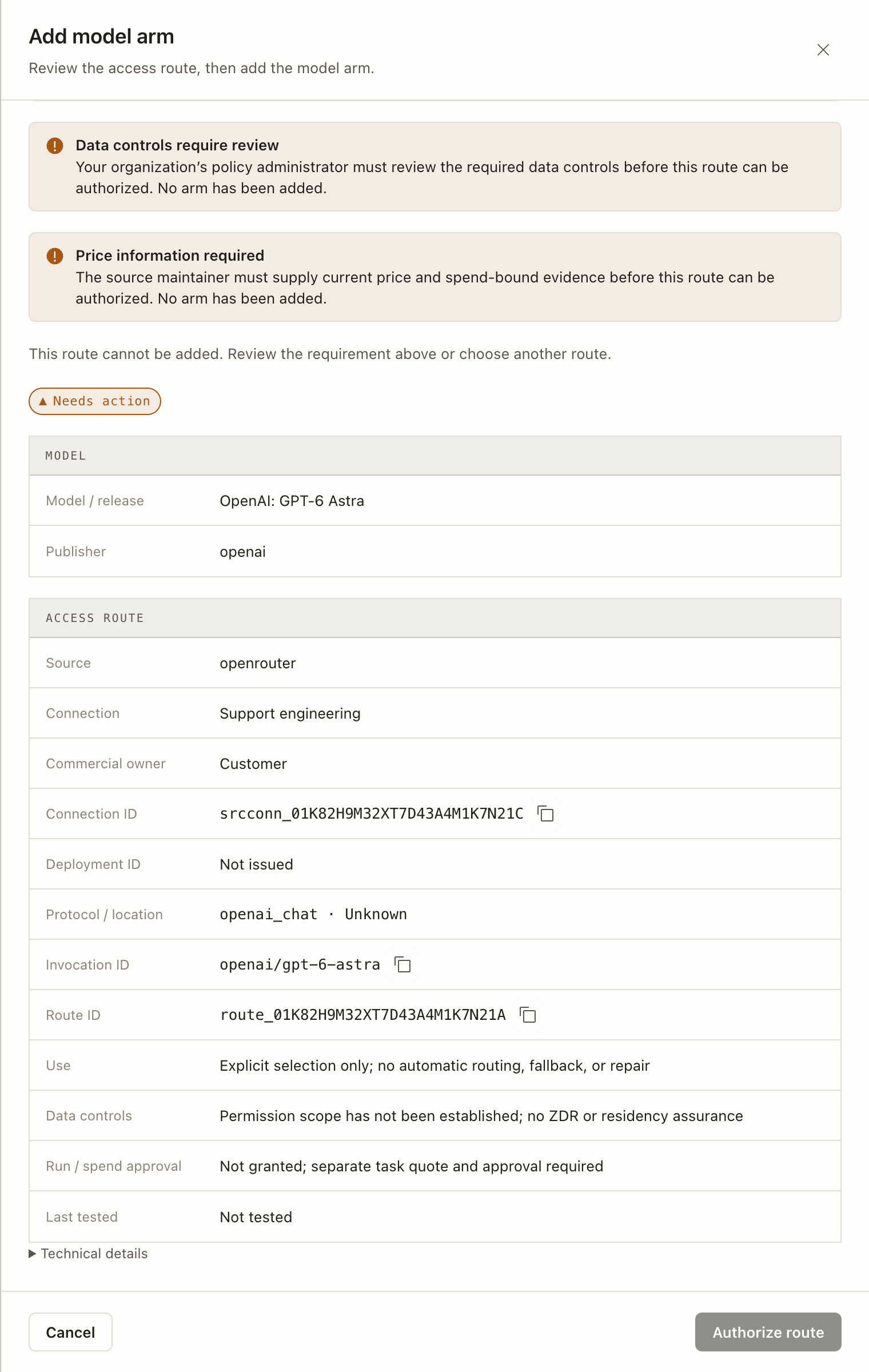
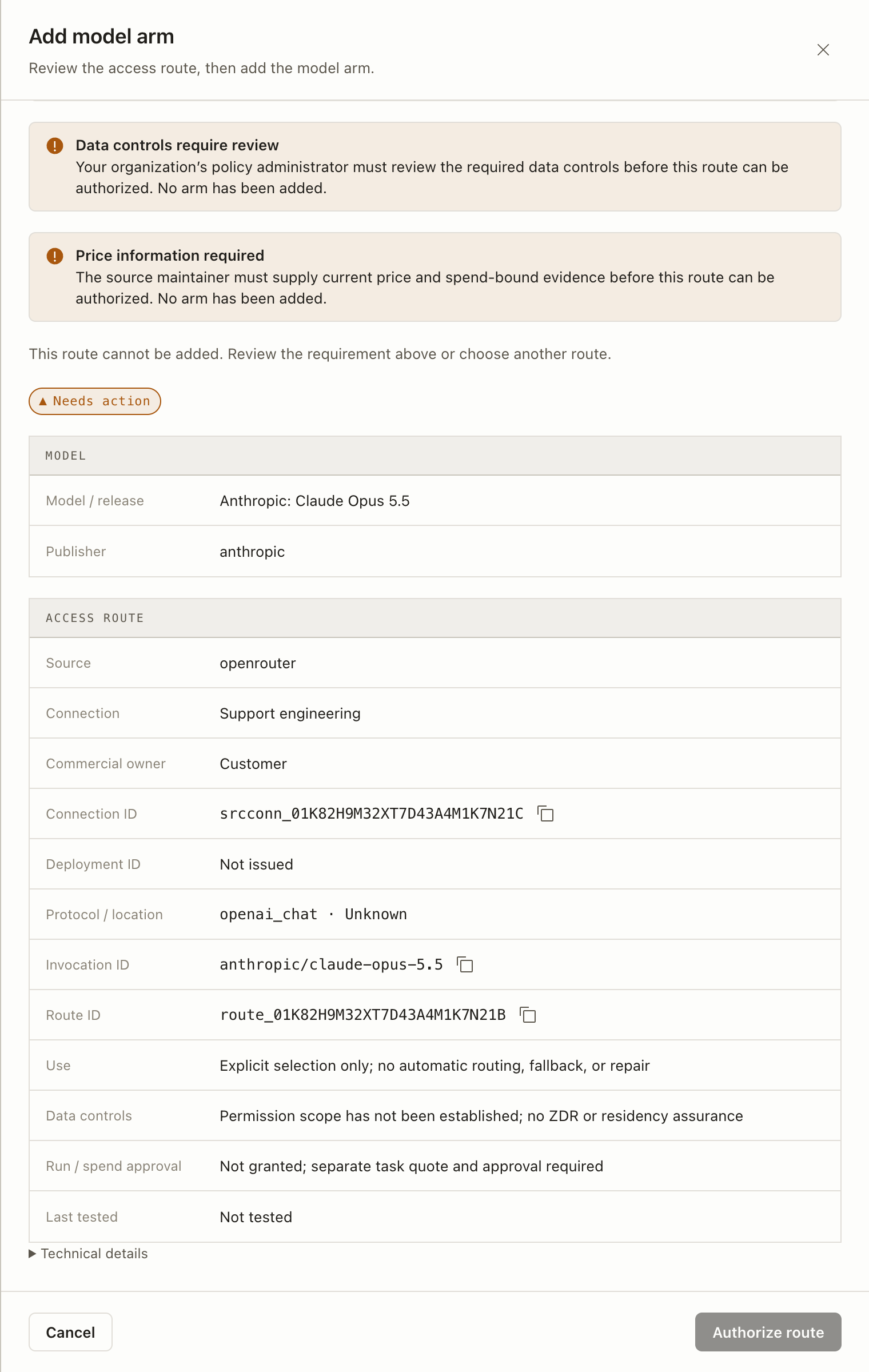
Inspect the account route
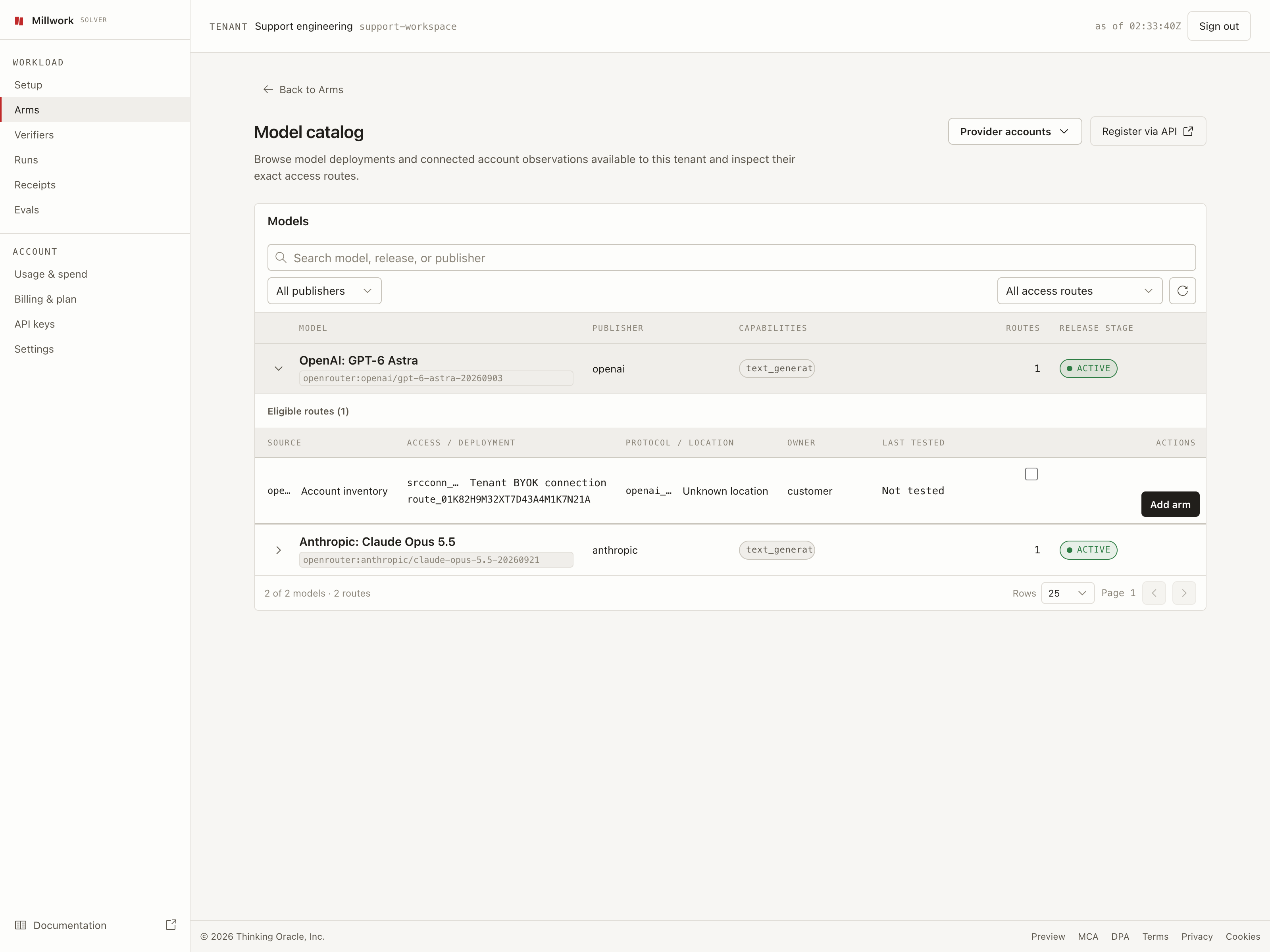
Expand GPT-6 Astra in Model catalog and choose Add arm. Repeat for
Claude Opus 5.5. Confirm the model and account in the Add model arm sheet.
Match Model / release, Publisher, Source, and the intended
Connection. Keep the exact connection and route identifiers.
Read Access route, its permission scope, and Last tested. Use
Read an access route
for every field, including Unknown, Not issued, data controls,
and test history.
Read every requirement and its next actor. Follow
Why is this route unavailable?
for current labels and supported recovery. Permission, saving, testing,
and paid-task approval remain separate.
Match the models and account. GPT-6 Astra and Claude Opus 5.5 should both
use Support engineering.
Listed models still need their account routes reviewed.
A saved model is a configured model option Millwork can run. Read the route
requirements even if the catalog shows ACTIVE or Eligible routes (1);
those labels do not establish paid-check eligibility.If Temporary label (optional) is available, you can
keep a local note for an account listing
while reviewing it. This optional note does not make the route eligible or
authorize the route or save a model.
2
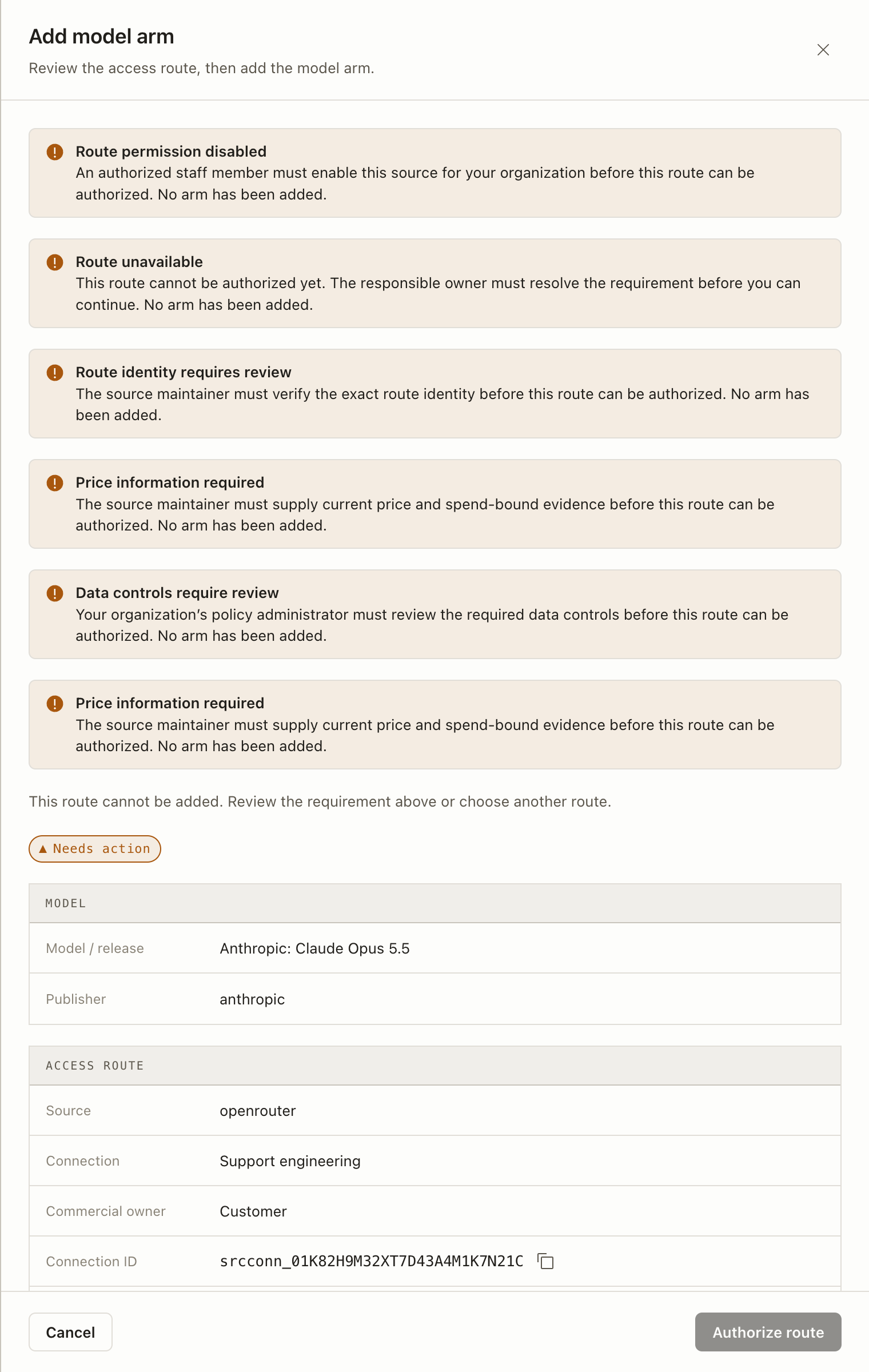
Read the requirements
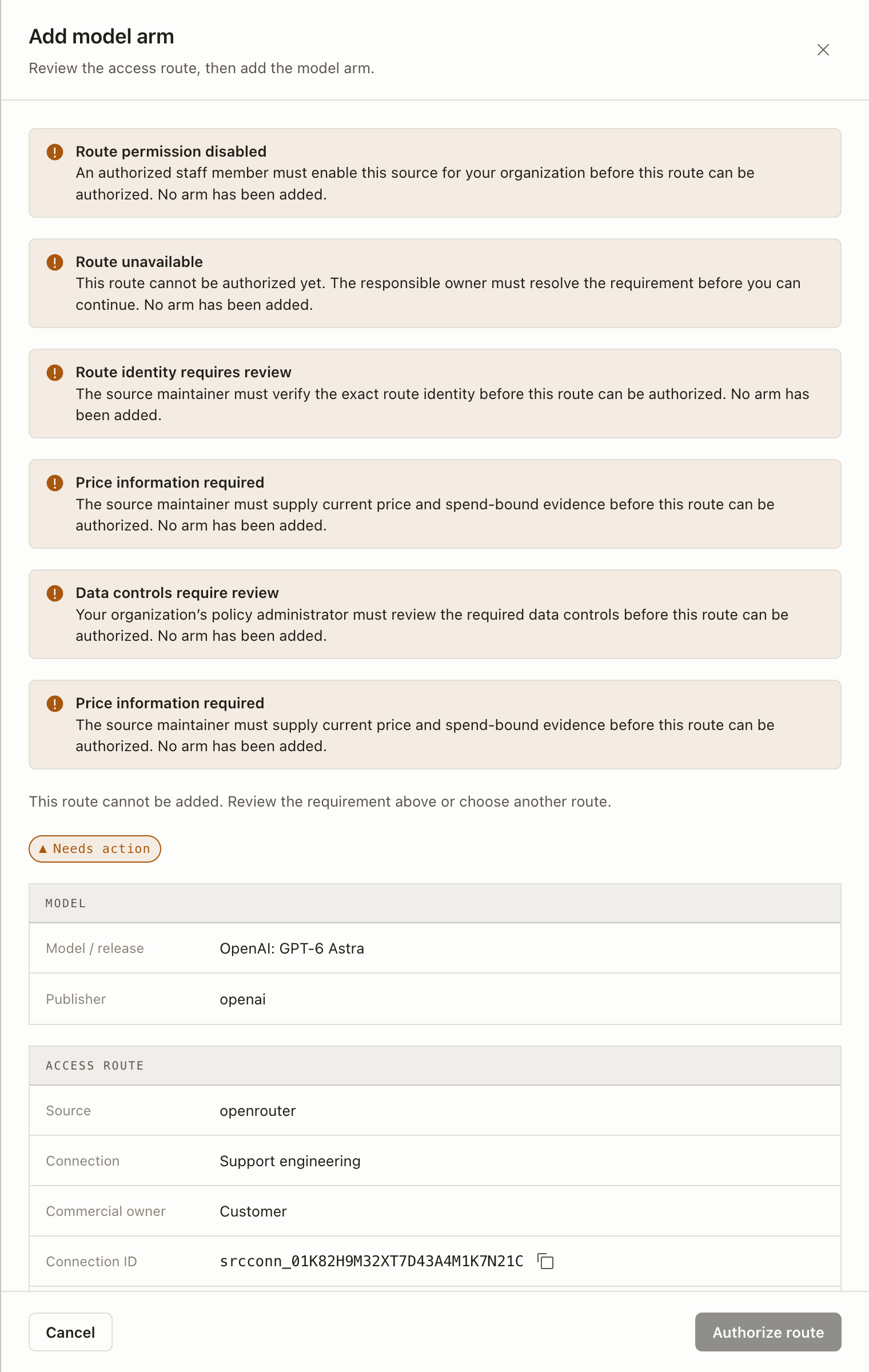
Both sheets show Needs action and a disabled Authorize route button.
The current source cannot establish the complete pricing and spend bounds
needed for these paid checks. Keep the routes at this requirement stage.
Resolve the requirements before authorizing. No permission or saved model
has been created.
An authorized staff member must enable the source for the organization.
Route unavailable
The responsible owner must resolve the route’s blocking requirement.
Route identity requires review
The source maintainer must verify the exact route identity.
Pricing needs review
The source maintainer must resolve current rates and billing conditions.
Maximum request cost needs review
The source maintainer must establish the complete maximum provider charge for one request.
Data controls require review
The organization’s policy administrator must review the data controls.
This example shows a subset of requirements. Older screenshots can say
Price information required; the current sheet separates pricing review
from maximum request cost. Use the
complete requirement and recovery reference
for the exact current notices. Do not infer that one repair clears them all.
Opus’s illustrative lower route details retain the blocked state.
Only after requirements have actually been met can a route be authorized and
registered through Add model arm > Add with defaults. Confirm Ready in
Arms and return through Browse model catalog. Reuse a matching ready saved
model if one exists. No saved model or permission is demonstrated for this pair.
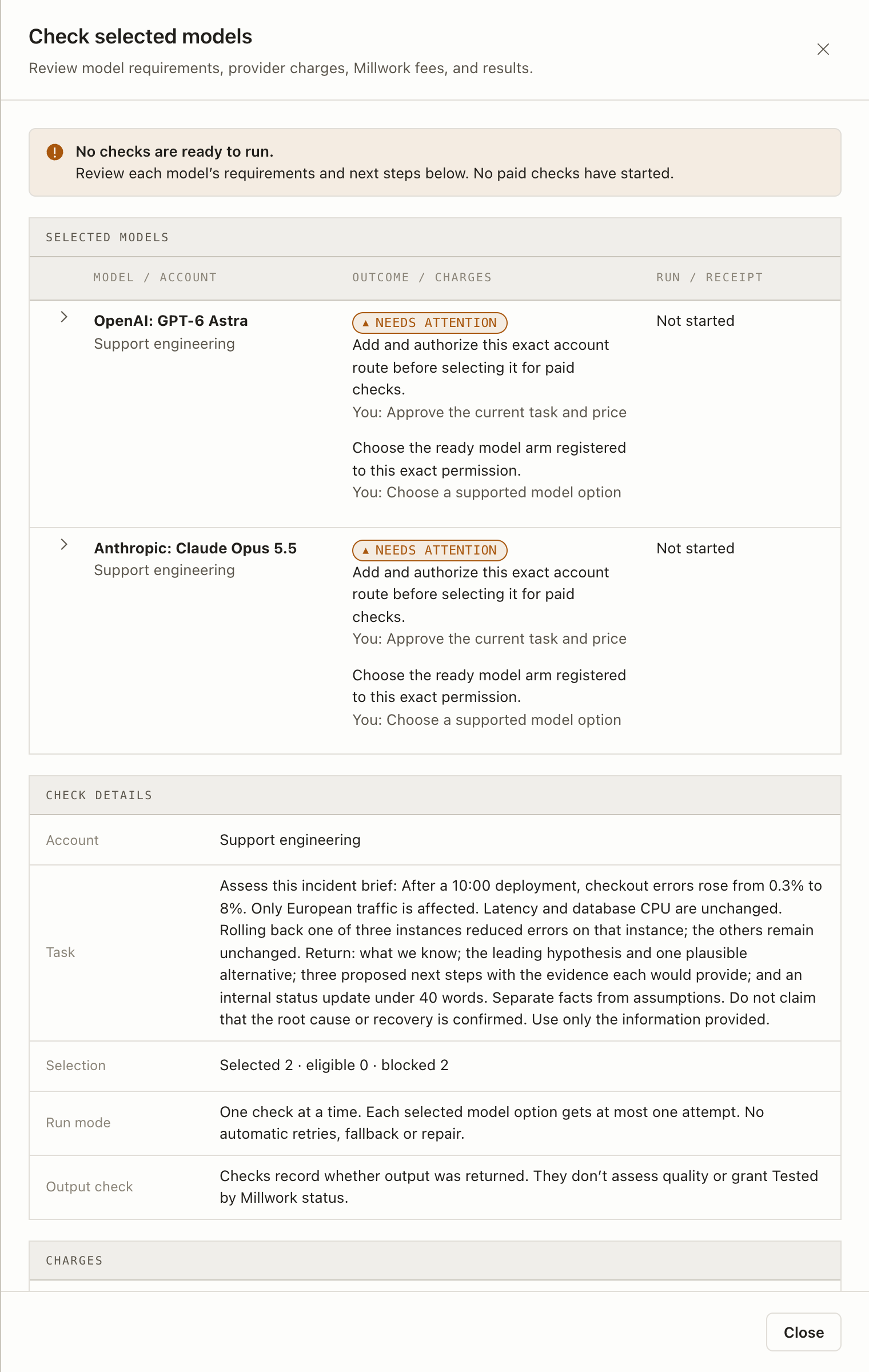
You can select these routes and prepare a read-only review. They remain
ineligible for paid checks, so there are no model responses or receipts to compare.
1
Prepare the incident task
Expand each intended model’s route in Model catalog. Select its checkbox
in Actions, then choose Review selected models (2). Enter this brief
in Task and choose Review requirements and costs. These preparation
actions start no paid checks.
Copy the incident task
Assess this incident brief: After a 10:00 deployment, checkout errors rose from 0.3% to 8%. Only European traffic is affected. Latency and database CPU are unchanged. Rolling back one of three instances reduced errors on that instance; the others remain unchanged. Return: what we know; the leading hypothesis and one plausible alternative; three proposed next steps with the evidence each would provide; and an internal status update under 40 words. Separate facts from assumptions. Do not claim that the root cause or recovery is confirmed. Use only the information provided.
2
Inspect the requirements review
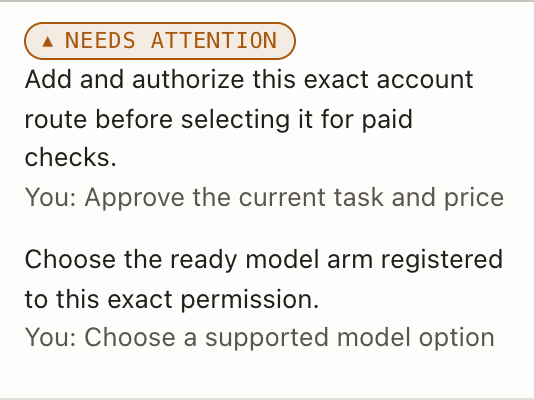
Read the selected, eligible and blocked counts and each model’s requirements.
This pair has 0 eligible checks: Selected 2 · eligible 0 · blocked 2.
Both show Needs attention and Not started. Resolve the requirements
before any paid approval.
Two selected, none eligible. Both models remain blocked. Nothing has started.
Screenshot details: Read-only review warning, selection count and run status.
Both models remain blocked. Resolve the route requirements shown in this
guide’s Add a model tab before authorizing a route and adding or selecting
its matching ready saved model.
Two selected routes, zero eligible checks, two blocked. No checks have started.
Before approving eligible checks, review each eligible model’s Provider maximum
and Separate fee, the total Maximum provider charges and Maximum
Millwork fees, and both deadlines. Review the current fees; each receipt
records the fee charged.Approval deadline is when you must confirm; Deadline to start new checks
is the latest start. Both are UTC. Only the displayed eligible set can be
approved while other options remain blocked.
3
Approve only eligible checks
Do not continue around Needs action or select paid consent for the
current routes.For a later eligible plan, permission to use a route and approval to spend
are separate decisions. The consent reads: I approve only the displayed
eligible paid checks, their provider maximum and the separate Millwork fee.After a valid review, use the approval button’s displayed eligible count.
Review again if the account, task, models, prices or deadlines change. Each
model gets at most one attempt, one check at a time, with no automatic retry
or fallback.
4
Inspect completed responses
After actual approval, open View check progress and select Refresh
progress. Read each model’s outcome; Scheduling finished can include
failed or blocked checks and charges not yet confirmed. Refreshing progress
starts no new checks.Run opens status; Original receipt records what ran and its charges,
without the task or response. Use the matching model’s original links. Keep
provider charges and Millwork fees separate. Maximum charges for checks that
have not started are not an amount already charged.Retrieve a completed run’s result
separately. Results can expire. Inspect whether the assessment separates facts
from assumptions, considers an alternative, explains the evidence each next
step would provide, and avoids claiming a confirmed root cause or recovery.
Read a completed model response
Use this only when you already have an original completed run ID from
its Run link. The two model routes shown here have not run. Use the
Millwork organization key you already configured
in a local terminal with curl and jq. Use a local scratch folder; keep
the key out of chat. This reads the existing result and starts no new run.The API URL includes /v1. The example accepts an existing
MILLWORK_API_KEY or the CLI’s SOLVERAPI_API_KEY; it never uses a provider key.
Inspect the printed text. A 404 means the result is unavailable, has not
been produced, or has expired. Inspect the original run and receipt; do not
automatically rerun the check to replace it.
The built-in check confirms output presence; it does not grade the assessment
or confer Tested by Millwork status. If charges are unconfirmed, do not retry or replace the original runs. Check actions > Cancel remaining checks stops new checks.
Accepted runs keep their fees; sent requests may finish and incur charges.
A browser or computer agent follows the dashboard’s observed labels and
accessibility names to prepare the review. It stops before the paid checkbox
and approval button.
A coding agent checks which documented CLI, MCP or API operations are
available and prepares the review.
It directs you to the dashboard for paid approval.
When reading this guide, select Connect provider, Add a model, or
Check models to read the relevant phase. Product actions happen in the
actual dashboard. Copy this shared instruction for either agent path. Adapt the example model and
account names if your choices differ. Attach this guide’s Copy page
Markdown with the brief.
Read the attached current guide Markdown first. Otherwise retrievehttps://docs.getmillwork.dev/guides/check-selected-models.md.If unavailable, ask me for the current Markdown; do not infer instructionsfrom screenshots or titles.Related docs: https://docs.getmillwork.dev/llms.txt andhttps://docs.getmillwork.dev/llms-full.txt.Documentation MCP: https://docs.getmillwork.dev/mcp/documentation.md.Canonical route fields:https://docs.getmillwork.dev/concepts/models-and-sources.md.Requirement owners and original-operation recovery:https://docs.getmillwork.dev/help/provider-connections.md.Help me review GPT-6 Astra and Claude Opus 5.5 through my Support engineeringOpenRouter account for this incident-assessment task. Confirm the intendedmodels, account and current routes. Task: Assess this incident brief: After a 10:00 deployment, checkout errors rose from 0.3% to 8%. Only European traffic is affected. Latency and database CPU are unchanged. Rolling back one of three instances reduced errors on that instance; the others remain unchanged. Return: what we know; the leading hypothesis and one plausible alternative; three proposed next steps with the evidence each would provide; and an internal status update under 40 words. Separate facts from assumptions. Do not claim that the root cause or recovery is confirmed. Use only the information provided.The current guide shows requirements that block these routes. Report thoserequirements and who must act; do not claim that eligibility, paid approvalor completed model responses exist. Do not bypass Needs action.When reading the rendered guide, select its observed Connect provider,Add a model and Check models tabs. Perform product actions in the actualdashboard. Use the browser/computer path or discover supported coding-clientoperations. Preserve the model/account/route names and exact returned IDs.Never derive IDs or permission from names. Keep credentials private.For the route-inspection step, report the exact organization/account/model,Source and payer, connection/route/invocation IDs, observation revision,confirmed deployment/authorization IDs, permission/expiry, data scope,protocol/location, and Last tested evidence. Quote every requirement andits actor/action. Keep connection tests and Provider Last live check separate.Mark unknown, not-issued, not-tested, and absent facts; do not borrow themfrom another route or image. During inspection, do not refresh, recover awrite, authorize, save, or run. Report missing installed client operations.For any later eligible plan, explain per-option and total provider maximums,separate current Millwork fees and deadlines. Stop before paid consent orapproval in the dashboard. If an original request is uncertain, retain itsrequest/key, recover it, and read fresh progress before more work. Do notretry or replace runs with charges not yet confirmed. After actual humanapproval, inspect original outcomes and receipts. Completed output needsthe documented result request; do not infer assessment quality from status.
Terms and detailed rules
A model is the AI system you want to try.A batch groups selected options and schedules eligible checks one at a time.
Accepted checks have individual runs; inspect their receipts when available.
Model routing chooses paths for later application requests. Selecting a
batch does not configure that routing.A provider serves the model API; the example uses OpenRouter as a
gateway. Your provider account is your access and billing account
there. A provider connection is Millwork’s saved link to that account.
Your Millwork organization is your team in Millwork, separate from
the provider account.A saved model is a configured option Millwork may run; the API calls
it an arm. If several match a selected route, choose the exact saved
model in the review. The catalog’s model route is a provider/account
path; a run route records which saved model a run chose. See
How model routing works.
Eligibility requires current account-route permission, a matching ready
saved model, and complete pricing and limit requirements. A listing,
selection, permission, saving, and paid approval are separate actions.
Select up to 20 exact routes on one connection and credential revision.
The selection also retains its filter and catalog snapshot. If those
change, review or explicitly clear the old selection before replacing it.
The shared task is at most 4,000 characters. This flow has no custom
output check, tools, repair, fallback, or automatic inference retry.
A check here is a paid live attempt, different from a free Echo test run.
Planning reserves no credits or quota and establishes no provider
balance. Each accepted check consumes one run from your quota and its
applicable Millwork fee. All amounts are USD, including sub-cent values.
Refreshing progress starts no new checks. Keep the original run IDs to connect each
selected option to its result, receipt, and support context.
If checks stop, charges are unclear, or you want to cancel
Situation
Next action
Needs attention
Resolve the named requirement with its responsible person. If facts or prices changed, use Review remaining checks, then explicitly approve Continue remaining checks for untouched work.
Charges unconfirmed
Do not retry the original run. Ask billing support to reconcile it. Continuing other untouched checks needs the displayed acknowledgment and approval; unresolved exposure still counts against the approved maximum.
Check original request
Keep the saved request and key unchanged. Recover that original operation, then load fresh progress: recovery returns a historical response, not current charges. If current progress is unavailable, hold replacement work.
You want to stop
Choose Check actions > Cancel remaining checks. New checks stop. Accepted runs keep their fees; sent provider requests may finish and incur charges. This does not establish a provider cancellation or refund.
Model usage and Millwork fees stay separate after cancellation. Use
Provider connection help for access problems
and Errors and retries for request recovery.
Copy the panel’s original IDs and support details when needed; exclude
credentials and private setup links from shared reports.
Details for browser and coding agents
A browser or computer agent starts from Arms > Browse model catalog.
Inspect the requirements in this guide’s Add a model tab, then close
the sheet and return to the catalog. You can prepare a read-only review
while these routes are blocked: select their checkboxes in Actions,
choose Review selected models (2), enter Task, and choose
Review requirements and costs. Authorization and a matching ready saved
model are required before paid checks, not before this review.For a later route whose requirements have actually been met, use Add arm,
review the named model and account, choose Authorize route, then
Add model arm > Add with defaults. Confirm Ready in Arms; reuse an
existing matching ready saved model. Follow visible labels and accessibility
names, not coordinates. Stop before the paid checkbox or approval button.Preserve the returned connection, binding revision, snapshot, filter,
item, route, observation, permission, and saved-model identities. Do not
derive IDs or authority from a model’s name. Preparation must use an
actually supported client and current returned facts.Source CLI and private execution-MCP batch start/resume refuse with
host_batch_approval_required. Direct the person to the dashboard for paid approval;
do not bypass that refusal or invent a published command.The documentation MCP uses search_millwork and
query_docs_filesystem_millwork to find and read docs. It cannot inspect
an account or execute paid checks. Discover its current address through
the server card.
Use a coding assistant explains
supported setup. Have the person complete private setup in their own browser;
never request provider credentials in chat.Treat unknown original runs as held, retain their original request/key,
and read current progress after historical recovery. Report per-item
outcomes, provider charges, charges not yet confirmed, maximum charges for
checks not started, and Millwork fees.
Scheduling completion never proves output quality or success for every item.
For a completed live run, the documented result operation is
GET /v1/executions/{executionId}/result. A Run page is not an answer
viewer. For the incident brief, inspect its facts, assumptions, next-step
evidence and status update yourself; the built-in check does not grade them.
⌘I
{"docsConfig":{"theme":"maple","$schema":"https://mintlify.com/docs.json","name":"Millwork","description":"Run AI tasks across your saved models, set rules for each task, and keep a receipt of what happened.","colors":{"primary":"#211f1b"},"logo":{"light":"https://mintcdn.com/millwork/BR05hHtKbP0z7-yd/logo/millwork.svg?fit=max\u0026auto=format\u0026n=BR05hHtKbP0z7-yd\u0026q=85\u0026s=50b7996bb125a40bfa2b98f60b35e127","dark":"https://mintcdn.com/millwork/BR05hHtKbP0z7-yd/logo/millwork.svg?fit=max\u0026auto=format\u0026n=BR05hHtKbP0z7-yd\u0026q=85\u0026s=50b7996bb125a40bfa2b98f60b35e127","href":"https://getmillwork.dev"},"favicon":"https://mintcdn.com/millwork/BR05hHtKbP0z7-yd/favicon.svg?fit=max\u0026auto=format\u0026n=BR05hHtKbP0z7-yd\u0026q=85\u0026s=107a8157b603eded17af3dfe866be50f","api":{"openapi":"openapi/solverapi.openapi.json","playground":{"display":"simple","proxy":false,"credentials":false},"examples":{"defaults":"required","languages":["curl","javascript"],"prefill":false,"autogenerate":true}},"appearance":{"default":"light","strict":true},"navbar":{"links":[{"href":"https://www.getmillwork.dev/contact/?product_interest=support","label":"Support"}],"primary":{"type":"button","label":"Apply for private preview","href":"https://www.getmillwork.dev/contact/"}},"footer":{"socials":{"github":"https://github.com/millworkdev"}},"seo":{"indexing":"navigable"},"icons":{"library":"lucide"},"integrations":{"telemetry":{"enabled":false}},"contextual":{"options":["copy","view"],"display":"header"},"styling":{"latex":true},"navigation":{"global":{"anchors":[{"anchor":"Dashboard","icon":"layout-dashboard","href":"https://app.getmillwork.dev"}]},"pages":[]}},"deployment":{"deploymentMetadataValue":{"subdomain":"millwork","hasAudioNarration":false,"actualSubdomain":"millwork","customDomains":["docs.getmillwork.dev"],"gitSource":{"type":"github","owner":"millworkdev","repo":"docs","deployBranch":"main","contentDirectory":"","isPrivate":true,"mountPath":"","label":""},"entitlements":{"AI_CHAT":{"status":"DISABLED"}},"buildId":"6af1eac9a4e37073d30d5ba8","clientVersion":"0.0.4094","searchFilterCounts":[{"language":"default","tag":"API reference","count":111},{"language":"default","tag":"Guides","count":28},{"language":"default","tag":"Cookbook","count":18},{"language":"default","tag":"Output checks","count":16},{"language":"default","tag":"Overview","count":12},{"language":"default","tag":"Provide models","count":9},{"language":"default","tag":"Get started","count":7},{"language":"default","tag":"Help","count":7},{"language":"default","tag":"Account model inventory","count":7},{"language":"default","tag":"Members","count":7}]},"assistantConfig":{"enableAskAiButton":false,"enableStarterQuestions":false,"enableContextualStarterQuestions":false,"enableAskAiSearchBar":true},"basePath":"","hasChatPermissions":false,"hasWebMcpPermissions":false,"toggles":[{"name":"kill-isr","enabled":true,"variant":{"name":"disabled","enabled":false,"feature_enabled":true},"impressionData":false},{"name":"agent-mintlify-slack","enabled":true,"variant":{"name":"disabled","enabled":false,"feature_enabled":true},"impressionData":false},{"name":"agent-integrations-settings","enabled":true,"variant":{"name":"disabled","enabled":false,"feature_enabled":true},"impressionData":false},{"name":"rbac-expansion","enabled":true,"variant":{"name":"disabled","enabled":false,"feature_enabled":true},"impressionData":false},{"name":"automations-pr-grouping","enabled":true,"variant":{"name":"disabled","enabled":false,"feature_enabled":true},"impressionData":false},{"name":"custom-prefix","enabled":true,"variant":{"name":"disabled","enabled":false,"feature_enabled":true},"impressionData":false},{"name":"analytics-v7","enabled":true,"variant":{"name":"disabled","enabled":false,"feature_enabled":true},"impressionData":false},{"name":"user-flows-analytics","enabled":true,"variant":{"name":"disabled","enabled":false,"feature_enabled":true},"impressionData":false},{"name":"no-publish-flow","enabled":true,"variant":{"name":"disabled","enabled":false,"feature_enabled":true},"impressionData":false},{"name":"workos-onboarding","enabled":true,"variant":{"name":"disabled","enabled":false,"feature_enabled":true},"impressionData":false},{"name":"llms-txt-v2","enabled":true,"variant":{"name":"disabled","enabled":false,"feature_enabled":true},"impressionData":false},{"name":"snapshot-serving-live","enabled":true,"variant":{"name":"disabled","enabled":false,"feature_enabled":true},"impressionData":false},{"name":"stripTemperatureMiddleware","enabled":true,"variant":{"name":"disabled","enabled":false,"feature_enabled":true},"impressionData":false},{"name":"support-platform-pylon-zendesk","enabled":true,"variant":{"name":"disabled","enabled":false,"feature_enabled":true},"impressionData":false},{"name":"snapshot-serving","enabled":true,"variant":{"name":"disabled","enabled":false,"feature_enabled":true},"impressionData":false},{"name":"instant-rollback","enabled":true,"variant":{"name":"disabled","enabled":false,"feature_enabled":true},"impressionData":false},{"name":"granular-notifications-server","enabled":true,"variant":{"name":"disabled","enabled":false,"feature_enabled":true},"impressionData":false},{"name":"granular-notifications","enabled":true,"variant":{"name":"disabled","enabled":false,"feature_enabled":true},"impressionData":false},{"name":"automations-fable","enabled":true,"variant":{"name":"disabled","enabled":false,"feature_enabled":true},"impressionData":false},{"name":"fixed-ai-action-pricing","enabled":true,"variant":{"name":"disabled","enabled":false,"feature_enabled":true},"impressionData":false},{"name":"automation-resolve-merge-conflict","enabled":true,"variant":{"name":"disabled","enabled":false,"feature_enabled":true},"impressionData":false},{"name":"scoped-publishing","enabled":true,"variant":{"name":"disabled","enabled":false,"feature_enabled":true},"impressionData":false},{"name":"mintql","enabled":true,"variant":{"name":"disabled","enabled":false,"feature_enabled":true},"impressionData":false},{"name":"page-level-analytics","enabled":true,"variant":{"name":"disabled","enabled":false,"feature_enabled":true},"impressionData":false},{"name":"editor-version-history-v2","enabled":true,"variant":{"name":"disabled","enabled":false,"feature_enabled":true},"impressionData":false},{"name":"billing-page-v2","enabled":true,"variant":{"name":"disabled","enabled":false,"feature_enabled":true},"impressionData":false},{"name":"full-page-search","enabled":true,"variant":{"name":"disabled","enabled":false,"feature_enabled":true},"impressionData":false},{"name":"workspace-projects","enabled":true,"variant":{"name":"disabled","enabled":false,"feature_enabled":true},"impressionData":false},{"name":"assistant-v5","enabled":true,"variant":{"name":"disabled","enabled":false,"feature_enabled":true},"impressionData":false},{"name":"fork-pr-previews","enabled":true,"variant":{"name":"disabled","enabled":false,"feature_enabled":true},"impressionData":false},{"name":"revalidation-jwt","enabled":true,"variant":{"name":"disabled","enabled":false,"feature_enabled":true},"impressionData":false},{"name":"workos-sso-scim","enabled":true,"variant":{"name":"disabled","enabled":false,"feature_enabled":true},"impressionData":false},{"name":"hobby-abuse-scan","enabled":true,"variant":{"name":"disabled","enabled":false,"feature_enabled":true},"impressionData":false},{"name":"dashboard-inbox","enabled":true,"variant":{"name":"disabled","enabled":false,"feature_enabled":true},"impressionData":false},{"name":"workos-signup","enabled":true,"variant":{"name":"disabled","enabled":false,"feature_enabled":true},"impressionData":false},{"name":"turbopuffer-dual-write","enabled":true,"variant":{"name":"disabled","enabled":false,"feature_enabled":true},"impressionData":false},{"name":"workos-enabled","enabled":true,"variant":{"name":"disabled","enabled":false,"feature_enabled":true},"impressionData":false},{"name":"approve-review-flow","enabled":true,"variant":{"name":"disabled","enabled":false,"feature_enabled":true},"impressionData":false},{"name":"editor-metadata","enabled":true,"variant":{"name":"disabled","enabled":false,"feature_enabled":true},"impressionData":false},{"name":"sso-setup-deadline-banner","enabled":true,"variant":{"name":"disabled","enabled":false,"feature_enabled":true},"impressionData":false},{"name":"turbopuffer-serve","enabled":true,"variant":{"name":"disabled","enabled":false,"feature_enabled":true},"impressionData":false},{"name":"live-agents","enabled":true,"variant":{"name":"disabled","enabled":false,"feature_enabled":true},"impressionData":false},{"name":"comment-mode","enabled":true,"variant":{"name":"disabled","enabled":false,"feature_enabled":true},"impressionData":false}],"googleFontsInlined":false},"customCss":[{"filePath":"completion-evidence.css","content":".completion-evidence-overview{border:1px solid rgba(192, 42, 42, 0.32);border-radius:0.75rem;overflow-x:auto}.completion-evidence-overview table{width:100%;margin:0;border-collapse:collapse}.completion-evidence-overview table th,.completion-evidence-overview table td{padding:0.75rem 0.9rem}.completion-evidence-overview table th{background:rgba(192, 42, 42, 0.045);border-bottom:1px solid rgba(192, 42, 42, 0.24)}.completion-evidence-overview table tr:last-child td{border-bottom:0}"},{"filePath":"coderabbit-review.css","content":".cookbook-action-card [role=\"link\"]{border-color:#d8abab;transition:border-color 160ms ease, background-color 160ms ease}.cookbook-action-card [role=\"link\"]:hover{background-color:#fcf8f8}@layer utilities{.cookbook-action-card .card[role=\"link\"]:hover{border-color:#c02a2a!important}}.cookbook-action-card [role=\"link\"]:focus-visible{outline:2px solid #c02a2a;outline-offset:2px}.cookbook-review-question blockquote{border-left:2px solid #c02a2a;background:transparent;box-shadow:none;padding-left:1rem}"},{"filePath":"agent-prompt.css","content":".agent-prompt .code-block{border-color:#7895A0}.agent-prompt [data-component-part=\"scroll-area-content\"]{min-width:0!important;width:100%}.agent-prompt [data-component-part=\"scroll-area-viewport\"]{padding-inline-end:3.5rem}.agent-prompt .code-block .whitespace-pre,.agent-prompt .code-block pre,.agent-prompt .code-block code,.agent-prompt .code-block .line{white-space:pre-wrap;overflow-wrap:anywhere;word-break:normal}.agent-prompt .code-block code{width:100%;max-width:100%;min-width:0;box-sizing:border-box}"},{"filePath":"primitive-handoff.css","content":".primitive-shadow-measures,.primitive-shadow-rules,.primitive-shadow-results,.primitive-handoff-adaptation{overscroll-behavior-x:contain;-webkit-overflow-scrolling:touch}.primitive-shadow-measures table th:first-child,.primitive-shadow-measures table td:first-child,.primitive-shadow-rules table th:first-child,.primitive-shadow-rules table td:first-child{width:4rem;white-space:nowrap}@media (max-width: 640px){.primitive-shadow-measures table{min-width:46rem}.primitive-shadow-rules table{min-width:36rem}.primitive-shadow-results table{min-width:48rem}.primitive-handoff-adaptation table{min-width:42rem}}"},{"filePath":"millwork-docs.css","content":":root{--millwork-docs-ink: #211f1b;--millwork-docs-line: #dedbd7;--millwork-docs-brand: #c02a2a}.nav-tabs-item[data-active=\"true\"]>.bg-primary{background-color:var(--millwork-docs-brand)}[data-component-part=\"tabs-list\"]{border-bottom-color:var(--millwork-docs-line);scrollbar-width:none}[data-component-part=\"tabs-list\"]::-webkit-scrollbar{display:none}[data-component-part=\"tab-button\"]{color:var(--millwork-docs-ink)}[data-component-part=\"tab-button\"][data-active=\"false\"]:hover{border-bottom-color:transparent}[data-component-part=\"tab-button\"][data-active=\"true\"]{border-bottom-color:var(--millwork-docs-brand);border-bottom-width:1px}@media (max-width: 420px){[data-component-part=\"tabs-list\"]{column-gap:0.75rem}}"},{"filePath":"model-check-guide.css","content":".model-guide-image-pan{max-width:100%;overflow-x:auto;overscroll-behavior-x:contain;-webkit-overflow-scrolling:touch}.model-guide-image-pan a{display:block;width:max-content}#content a:has(>img[src*=\"/images/model-checks/frontier/\"]){border:0;background-image:none;text-decoration:none;box-shadow:none}#content .model-guide-requirements table{display:table;width:100%;min-width:0;max-width:100%;table-layout:fixed}#content .model-guide-requirements th,#content .model-guide-requirements td{min-width:0;white-space:normal;overflow-wrap:anywhere;padding:0.6rem;vertical-align:top}#content .model-guide-requirements th:first-child,#content .model-guide-requirements td:first-child{width:40%}#content .model-guide-requirements th:last-child,#content .model-guide-requirements td:last-child{width:60%}.model-guide-screenshot-group{display:grid;gap:1rem;min-width:0;width:100%}.model-guide-evidence{margin-block-end:1.25em}.temporary-label-choice,.temporary-label-undo{width:687px;min-width:687px;max-width:none}@media (max-width: 767px){.temporary-label-choice{width:268px;min-width:0;max-width:100%}.temporary-label-undo{width:130px;min-width:0;max-width:100%}}"}],"page":{"pagePath":"guides/check-selected-models","slug":"/guides/check-selected-models","pageMetadata":{"title":"Check selected models with one task","sidebarTitle":"Check selected models","description":"Review account setup, model requirements and checks by phase.","keywords":["model selection","provider account","model route","permission","price review","approve","receipt"],"href":"/guides/check-selected-models"},"description":{"compiledSource":"\"use strict\";\nconst {jsx: _jsx} = arguments[0];\nconst {useMDXComponents: _provideComponents} = arguments[0];\nfunction _createMdxContent(props) {\n const _components = {\n p: \"p\",\n ..._provideComponents(),\n ...props.components\n };\n return _jsx(_components.p, {\n children: \"Review account setup, model requirements and checks by phase.\"\n });\n}\nfunction MDXContent(props = {}) {\n const {wrapper: MDXLayout} = {\n ..._provideComponents(),\n ...props.components\n };\n return MDXLayout ? _jsx(MDXLayout, {\n ...props,\n children: _jsx(_createMdxContent, {\n ...props\n })\n }) : _createMdxContent(props);\n}\nreturn {\n default: MDXContent\n};\n","frontmatter":{},"scope":{}},"pageType":"default","mdx":{"mdxSource":{"compiledSource":"\"use strict\";const{Fragment:_Fragment,jsx:_jsx,jsxs:_jsxs}=arguments[0];const{useMDXComponents:_provideComponents}=arguments[0];function _createMdxContent(props){const _components={a:`a`,blockquote:`blockquote`,code:`code`,li:`li`,ol:`ol`,p:`p`,pre:`pre`,span:`span`,strong:`strong`,tbody:`tbody`,td:`td`,th:`th`,thead:`thead`,tr:`tr`,ul:`ul`,..._provideComponents(),...props.components},{Accordion,AccordionGroup,CodeBlock,Frame,Heading,Note,Step,Steps,Tab,Table,Tabs,Warning}=_components;if(!Accordion)_missingMdxReference(`Accordion`,true);if(!AccordionGroup)_missingMdxReference(`AccordionGroup`,true);if(!CodeBlock)_missingMdxReference(`CodeBlock`,true);if(!Frame)_missingMdxReference(`Frame`,true);if(!Heading)_missingMdxReference(`Heading`,true);if(!Note)_missingMdxReference(`Note`,true);if(!Step)_missingMdxReference(`Step`,true);if(!Steps)_missingMdxReference(`Steps`,true);if(!Tab)_missingMdxReference(`Tab`,true);if(!Table)_missingMdxReference(`Table`,true);if(!Tabs)_missingMdxReference(`Tabs`,true);if(!Warning)_missingMdxReference(`Warning`,true);return _jsxs(_Fragment,{children:[_jsxs(_components.p,{children:[`Review `,_jsx(_components.strong,{children:`GPT-6 Astra`}),` and `,_jsx(_components.strong,{children:`Claude Opus 5.5`}),` for a checkout incident.`]}),`\n`,_jsx(Warning,{children:_jsxs(_components.p,{children:[`These routes show `,_jsx(_components.strong,{children:`Needs action`}),`. Prepare the review now; paid checks stay\nblocked until price and account requirements are resolved.`]})}),`\n`,_jsxs(Tabs,{children:[_jsxs(Tab,{title:`Connect provider`,id:`connect-provider`,children:[_jsxs(_components.p,{children:[`If your account is already connected, open this guide’s `,_jsx(_components.strong,{children:`Add a model`}),` tab. Open `,_jsx(_components.strong,{children:`Check models`}),`\nto prepare the task and inspect the selected routes’ requirements.`]}),_jsxs(Steps,{children:[_jsxs(Step,{title:`Open provider setup`,children:[_jsxs(_components.p,{children:[`From `,_jsx(_components.strong,{children:`Arms`}),`, choose `,_jsx(_components.strong,{children:`Browse model catalog`}),`, then open\n`,_jsx(_components.strong,{children:`Provider accounts > Connect a provider`}),`.`]}),_jsx(`div`,{className:`model-guide-evidence`,children:_jsx(Frame,{caption:`Screenshot detail: Connect a provider, from Provider accounts in the catalog.`,children:_jsxs(_components.a,{href:`/images/model-checks/frontier/30-provider-entry.native-detail.png`,target:`_blank`,rel:`noreferrer`,\"aria-label\":`Open full-size screenshot: Provider accounts menu with Connect a provider selected.`,children:[_jsx(`img`,{noZoom:true,width:228,src:`https://mintcdn.com/millwork/K0j_D_ShdV-Ph8nu/images/model-checks/frontier/30-provider-entry.native-detail.png?fit=max\u0026auto=format\u0026n=K0j_D_ShdV-Ph8nu\u0026q=85\u0026s=5086d2fdf4109412e8ea2456118c6983`,alt:`Provider accounts menu with Connect a provider selected.`,\"data-og-width\":`456`,\"data-og-height\":`240`,\"data-path\":`images/model-checks/frontier/30-provider-entry.native-detail.png`,\"data-optimize\":`true`,\"data-opv\":`3`,srcset:`https://mintcdn.com/millwork/K0j_D_ShdV-Ph8nu/images/model-checks/frontier/30-provider-entry.native-detail.png?w=280\u0026fit=max\u0026auto=format\u0026n=K0j_D_ShdV-Ph8nu\u0026q=85\u0026s=f6adc1c80dc77d387c5e6464647fd188 280w, https://mintcdn.com/millwork/K0j_D_ShdV-Ph8nu/images/model-checks/frontier/30-provider-entry.native-detail.png?w=560\u0026fit=max\u0026auto=format\u0026n=K0j_D_ShdV-Ph8nu\u0026q=85\u0026s=3e13433dbd4b31868c41e89458b240a1 560w, https://mintcdn.com/millwork/K0j_D_ShdV-Ph8nu/images/model-checks/frontier/30-provider-entry.native-detail.png?w=840\u0026fit=max\u0026auto=format\u0026n=K0j_D_ShdV-Ph8nu\u0026q=85\u0026s=d77da75e30d0a09188e3135fa74a54cd 840w, https://mintcdn.com/millwork/K0j_D_ShdV-Ph8nu/images/model-checks/frontier/30-provider-entry.native-detail.png?w=1100\u0026fit=max\u0026auto=format\u0026n=K0j_D_ShdV-Ph8nu\u0026q=85\u0026s=33b986f2019f45a58ecc5a8717ccbb49 1100w, https://mintcdn.com/millwork/K0j_D_ShdV-Ph8nu/images/model-checks/frontier/30-provider-entry.native-detail.png?w=1650\u0026fit=max\u0026auto=format\u0026n=K0j_D_ShdV-Ph8nu\u0026q=85\u0026s=0ee519d1dcf5f000448293ad5b7edb57 1650w, https://mintcdn.com/millwork/K0j_D_ShdV-Ph8nu/images/model-checks/frontier/30-provider-entry.native-detail.png?w=2500\u0026fit=max\u0026auto=format\u0026n=K0j_D_ShdV-Ph8nu\u0026q=85\u0026s=91a3b4e79548ceb92dc63340927edfc7 2500w`}),_jsx(`span`,{className:`mint-sr-only`,children:`Open full-size screenshot`})]})})}),_jsx(Accordion,{title:`View full catalog screen`,id:`view-full-catalog-screen`,children:_jsx(Frame,{caption:`Start from Provider accounts in the current model catalog.`,children:_jsxs(_components.a,{href:`/images/model-checks/frontier/30-provider-entry.full.png`,target:`_blank`,rel:`noreferrer`,\"aria-label\":`Open full-size screenshot: Model catalog with Astra and Opus listed and the Provider accounts menu open.`,children:[_jsx(`img`,{noZoom:true,src:`https://mintcdn.com/millwork/K0j_D_ShdV-Ph8nu/images/model-checks/frontier/30-provider-entry.full.png?fit=max\u0026auto=format\u0026n=K0j_D_ShdV-Ph8nu\u0026q=85\u0026s=a19ee247c019a804d040e48b87062e97`,alt:`Model catalog with Astra and Opus listed and the Provider accounts menu open.`,\"data-og-width\":`3200`,width:`3200`,\"data-og-height\":`2400`,height:`2400`,\"data-path\":`images/model-checks/frontier/30-provider-entry.full.png`,\"data-optimize\":`true`,\"data-opv\":`3`,srcset:`https://mintcdn.com/millwork/K0j_D_ShdV-Ph8nu/images/model-checks/frontier/30-provider-entry.full.png?w=280\u0026fit=max\u0026auto=format\u0026n=K0j_D_ShdV-Ph8nu\u0026q=85\u0026s=fd4c64867b25d894c97fb9256179ac58 280w, https://mintcdn.com/millwork/K0j_D_ShdV-Ph8nu/images/model-checks/frontier/30-provider-entry.full.png?w=560\u0026fit=max\u0026auto=format\u0026n=K0j_D_ShdV-Ph8nu\u0026q=85\u0026s=88798c56688004da422a676f53019991 560w, https://mintcdn.com/millwork/K0j_D_ShdV-Ph8nu/images/model-checks/frontier/30-provider-entry.full.png?w=840\u0026fit=max\u0026auto=format\u0026n=K0j_D_ShdV-Ph8nu\u0026q=85\u0026s=0fb7f0a536cf64250aef8e7333a29eb5 840w, https://mintcdn.com/millwork/K0j_D_ShdV-Ph8nu/images/model-checks/frontier/30-provider-entry.full.png?w=1100\u0026fit=max\u0026auto=format\u0026n=K0j_D_ShdV-Ph8nu\u0026q=85\u0026s=11e4365063ac05661db2df04b3130f59 1100w, https://mintcdn.com/millwork/K0j_D_ShdV-Ph8nu/images/model-checks/frontier/30-provider-entry.full.png?w=1650\u0026fit=max\u0026auto=format\u0026n=K0j_D_ShdV-Ph8nu\u0026q=85\u0026s=661fde3c1b34645110d8fbe746b6ec82 1650w, https://mintcdn.com/millwork/K0j_D_ShdV-Ph8nu/images/model-checks/frontier/30-provider-entry.full.png?w=2500\u0026fit=max\u0026auto=format\u0026n=K0j_D_ShdV-Ph8nu\u0026q=85\u0026s=fe5a9c2554ff04a7cacd9df39f5725ab 2500w`}),_jsx(`span`,{className:`mint-sr-only`,children:`Open full-size screenshot`})]})})})]}),_jsxs(Step,{title:`Name the connection`,children:[_jsxs(_components.p,{children:[`Set up the account you’ll use for both models. These field details are shown\nbefore `,_jsx(_components.strong,{children:`Continue`}),`.`]}),_jsxs(_components.p,{children:[`Choose `,_jsx(_components.strong,{children:`OpenRouter`}),` and keep the displayed authentication method.`]}),_jsx(`div`,{className:`model-guide-evidence`,children:_jsx(Frame,{caption:`Screenshot details: Provider and Authentication.`,children:_jsxs(`div`,{className:`model-guide-screenshot-group`,children:[_jsx(`p`,{children:`Provider`}),_jsx(`div`,{className:`model-guide-image-pan`,role:`region`,\"aria-label\":`Provider field fragment: OpenRouter.`,tabIndex:0,children:_jsxs(_components.a,{href:`/images/model-checks/frontier/31-provider-field.png`,target:`_blank`,rel:`noreferrer`,\"aria-label\":`Open full-size screenshot: Provider field fragment: OpenRouter.`,children:[_jsx(`img`,{noZoom:true,width:320,style:{minWidth:320,maxWidth:`none`},src:`https://mintcdn.com/millwork/K0j_D_ShdV-Ph8nu/images/model-checks/frontier/31-provider-field.png?fit=max\u0026auto=format\u0026n=K0j_D_ShdV-Ph8nu\u0026q=85\u0026s=059aa7866057206f5246838506356a4d`,alt:`Provider field fragment: OpenRouter.`,\"data-og-width\":`640`,\"data-og-height\":`146`,\"data-path\":`images/model-checks/frontier/31-provider-field.png`,\"data-optimize\":`true`,\"data-opv\":`3`,srcset:`https://mintcdn.com/millwork/K0j_D_ShdV-Ph8nu/images/model-checks/frontier/31-provider-field.png?w=280\u0026fit=max\u0026auto=format\u0026n=K0j_D_ShdV-Ph8nu\u0026q=85\u0026s=279b3b84b0985a40868e631c75b06d8c 280w, https://mintcdn.com/millwork/K0j_D_ShdV-Ph8nu/images/model-checks/frontier/31-provider-field.png?w=560\u0026fit=max\u0026auto=format\u0026n=K0j_D_ShdV-Ph8nu\u0026q=85\u0026s=9687354ff0290e0d2d1ebbb0140b735c 560w, https://mintcdn.com/millwork/K0j_D_ShdV-Ph8nu/images/model-checks/frontier/31-provider-field.png?w=840\u0026fit=max\u0026auto=format\u0026n=K0j_D_ShdV-Ph8nu\u0026q=85\u0026s=3fcc9d42d815827080bc2d3548dee746 840w, https://mintcdn.com/millwork/K0j_D_ShdV-Ph8nu/images/model-checks/frontier/31-provider-field.png?w=1100\u0026fit=max\u0026auto=format\u0026n=K0j_D_ShdV-Ph8nu\u0026q=85\u0026s=5e36ff6b8366834343948948464a937b 1100w, https://mintcdn.com/millwork/K0j_D_ShdV-Ph8nu/images/model-checks/frontier/31-provider-field.png?w=1650\u0026fit=max\u0026auto=format\u0026n=K0j_D_ShdV-Ph8nu\u0026q=85\u0026s=e442a9ff784e2c2fcac181567563d39b 1650w, https://mintcdn.com/millwork/K0j_D_ShdV-Ph8nu/images/model-checks/frontier/31-provider-field.png?w=2500\u0026fit=max\u0026auto=format\u0026n=K0j_D_ShdV-Ph8nu\u0026q=85\u0026s=358c36ba773f4414ef7bfc7813be3269 2500w`}),_jsx(`span`,{className:`mint-sr-only`,children:`Open full-size screenshot`})]})}),_jsx(`p`,{children:`Authentication`}),_jsx(`div`,{className:`model-guide-image-pan`,role:`region`,\"aria-label\":`Authentication field fragment: API key.`,tabIndex:0,children:_jsxs(_components.a,{href:`/images/model-checks/frontier/31-authentication-field.png`,target:`_blank`,rel:`noreferrer`,\"aria-label\":`Open full-size screenshot: Authentication field fragment: API key.`,children:[_jsx(`img`,{noZoom:true,width:320,style:{minWidth:320,maxWidth:`none`},src:`https://mintcdn.com/millwork/K0j_D_ShdV-Ph8nu/images/model-checks/frontier/31-authentication-field.png?fit=max\u0026auto=format\u0026n=K0j_D_ShdV-Ph8nu\u0026q=85\u0026s=28794a98afafd497d3abb8a51cf142a3`,alt:`Authentication field fragment: API key.`,\"data-og-width\":`640`,\"data-og-height\":`146`,\"data-path\":`images/model-checks/frontier/31-authentication-field.png`,\"data-optimize\":`true`,\"data-opv\":`3`,srcset:`https://mintcdn.com/millwork/K0j_D_ShdV-Ph8nu/images/model-checks/frontier/31-authentication-field.png?w=280\u0026fit=max\u0026auto=format\u0026n=K0j_D_ShdV-Ph8nu\u0026q=85\u0026s=e87fa10a58b20b62e5f4044640e0e1a0 280w, https://mintcdn.com/millwork/K0j_D_ShdV-Ph8nu/images/model-checks/frontier/31-authentication-field.png?w=560\u0026fit=max\u0026auto=format\u0026n=K0j_D_ShdV-Ph8nu\u0026q=85\u0026s=2401bbef5bb81cd31064016c736f6232 560w, https://mintcdn.com/millwork/K0j_D_ShdV-Ph8nu/images/model-checks/frontier/31-authentication-field.png?w=840\u0026fit=max\u0026auto=format\u0026n=K0j_D_ShdV-Ph8nu\u0026q=85\u0026s=992611807051e060b1dc76e82beea1af 840w, https://mintcdn.com/millwork/K0j_D_ShdV-Ph8nu/images/model-checks/frontier/31-authentication-field.png?w=1100\u0026fit=max\u0026auto=format\u0026n=K0j_D_ShdV-Ph8nu\u0026q=85\u0026s=8ce23bd91995f7dcc2583f7165bbf14a 1100w, https://mintcdn.com/millwork/K0j_D_ShdV-Ph8nu/images/model-checks/frontier/31-authentication-field.png?w=1650\u0026fit=max\u0026auto=format\u0026n=K0j_D_ShdV-Ph8nu\u0026q=85\u0026s=14cb920fe20cc5752c9530981eaedd7e 1650w, https://mintcdn.com/millwork/K0j_D_ShdV-Ph8nu/images/model-checks/frontier/31-authentication-field.png?w=2500\u0026fit=max\u0026auto=format\u0026n=K0j_D_ShdV-Ph8nu\u0026q=85\u0026s=8f5a10a031560397798f0acbd8dd1f90 2500w`}),_jsx(`span`,{className:`mint-sr-only`,children:`Open full-size screenshot`})]})})]})})}),_jsxs(_components.p,{children:[`Use `,_jsx(_components.strong,{children:`Support engineering`}),` so you can recognize this account later.`]}),_jsx(`div`,{className:`model-guide-evidence`,children:_jsx(Frame,{caption:`Screenshot details: Connection name and Continue in the setup footer.`,children:_jsxs(`div`,{className:`model-guide-screenshot-group`,children:[_jsx(`p`,{children:`Connection name`}),_jsx(`div`,{className:`model-guide-image-pan`,role:`region`,\"aria-label\":`Connection-name field fragment: Support engineering.`,tabIndex:0,children:_jsxs(_components.a,{href:`/images/model-checks/frontier/31-connection-name.png`,target:`_blank`,rel:`noreferrer`,\"aria-label\":`Open full-size screenshot: Connection-name field fragment: Support engineering.`,children:[_jsx(`img`,{noZoom:true,width:320,style:{minWidth:320,maxWidth:`none`},src:`https://mintcdn.com/millwork/K0j_D_ShdV-Ph8nu/images/model-checks/frontier/31-connection-name.png?fit=max\u0026auto=format\u0026n=K0j_D_ShdV-Ph8nu\u0026q=85\u0026s=3a6558a36fee8ea1034c3ddb2c3509df`,alt:`Connection-name field fragment: Support engineering.`,\"data-og-width\":`640`,\"data-og-height\":`146`,\"data-path\":`images/model-checks/frontier/31-connection-name.png`,\"data-optimize\":`true`,\"data-opv\":`3`,srcset:`https://mintcdn.com/millwork/K0j_D_ShdV-Ph8nu/images/model-checks/frontier/31-connection-name.png?w=280\u0026fit=max\u0026auto=format\u0026n=K0j_D_ShdV-Ph8nu\u0026q=85\u0026s=801718a4decb0da9c338f6ca602de79e 280w, https://mintcdn.com/millwork/K0j_D_ShdV-Ph8nu/images/model-checks/frontier/31-connection-name.png?w=560\u0026fit=max\u0026auto=format\u0026n=K0j_D_ShdV-Ph8nu\u0026q=85\u0026s=15493eb59ce6fe3283d72968269eb1f5 560w, https://mintcdn.com/millwork/K0j_D_ShdV-Ph8nu/images/model-checks/frontier/31-connection-name.png?w=840\u0026fit=max\u0026auto=format\u0026n=K0j_D_ShdV-Ph8nu\u0026q=85\u0026s=a701dec047988e69435c1e3655e8d4cd 840w, https://mintcdn.com/millwork/K0j_D_ShdV-Ph8nu/images/model-checks/frontier/31-connection-name.png?w=1100\u0026fit=max\u0026auto=format\u0026n=K0j_D_ShdV-Ph8nu\u0026q=85\u0026s=f117129695f06e304a4f8a1bf10ce554 1100w, https://mintcdn.com/millwork/K0j_D_ShdV-Ph8nu/images/model-checks/frontier/31-connection-name.png?w=1650\u0026fit=max\u0026auto=format\u0026n=K0j_D_ShdV-Ph8nu\u0026q=85\u0026s=db9c81464fbcd24044476beb5e51b266 1650w, https://mintcdn.com/millwork/K0j_D_ShdV-Ph8nu/images/model-checks/frontier/31-connection-name.png?w=2500\u0026fit=max\u0026auto=format\u0026n=K0j_D_ShdV-Ph8nu\u0026q=85\u0026s=df6224eace691a61fc8b0cc03e19edc9 2500w`}),_jsx(`span`,{className:`mint-sr-only`,children:`Open full-size screenshot`})]})}),_jsx(`p`,{children:`Continue in the setup footer`}),_jsxs(_components.a,{href:`/images/model-checks/frontier/31-continue-action.png`,target:`_blank`,rel:`noreferrer`,\"aria-label\":`Open full-size screenshot: Native Continue button from the provider setup footer.`,children:[_jsx(`img`,{noZoom:true,width:96,src:`https://mintcdn.com/millwork/K0j_D_ShdV-Ph8nu/images/model-checks/frontier/31-continue-action.png?fit=max\u0026auto=format\u0026n=K0j_D_ShdV-Ph8nu\u0026q=85\u0026s=b09db7f8983ab716ece58b908716891e`,alt:`Native Continue button from the provider setup footer.`,\"data-og-width\":`192`,\"data-og-height\":`88`,\"data-path\":`images/model-checks/frontier/31-continue-action.png`,\"data-optimize\":`true`,\"data-opv\":`3`,srcset:`https://mintcdn.com/millwork/K0j_D_ShdV-Ph8nu/images/model-checks/frontier/31-continue-action.png?w=280\u0026fit=max\u0026auto=format\u0026n=K0j_D_ShdV-Ph8nu\u0026q=85\u0026s=b359cb1a538fdee8fe7f6b00ee155a2a 280w, https://mintcdn.com/millwork/K0j_D_ShdV-Ph8nu/images/model-checks/frontier/31-continue-action.png?w=560\u0026fit=max\u0026auto=format\u0026n=K0j_D_ShdV-Ph8nu\u0026q=85\u0026s=cf72b9b041f8c09169f24d741cbf72c3 560w, https://mintcdn.com/millwork/K0j_D_ShdV-Ph8nu/images/model-checks/frontier/31-continue-action.png?w=840\u0026fit=max\u0026auto=format\u0026n=K0j_D_ShdV-Ph8nu\u0026q=85\u0026s=e455a96c306cf5e806a28ee03aea9fb7 840w, https://mintcdn.com/millwork/K0j_D_ShdV-Ph8nu/images/model-checks/frontier/31-continue-action.png?w=1100\u0026fit=max\u0026auto=format\u0026n=K0j_D_ShdV-Ph8nu\u0026q=85\u0026s=e37e87151d54af10d69810bb9e4029b6 1100w, https://mintcdn.com/millwork/K0j_D_ShdV-Ph8nu/images/model-checks/frontier/31-continue-action.png?w=1650\u0026fit=max\u0026auto=format\u0026n=K0j_D_ShdV-Ph8nu\u0026q=85\u0026s=5d7622ac548a0087130216b8d4331459 1650w, https://mintcdn.com/millwork/K0j_D_ShdV-Ph8nu/images/model-checks/frontier/31-continue-action.png?w=2500\u0026fit=max\u0026auto=format\u0026n=K0j_D_ShdV-Ph8nu\u0026q=85\u0026s=313be9d757546715da1e689c51496349 2500w`}),_jsx(`span`,{className:`mint-sr-only`,children:`Open full-size screenshot`})]})]})})}),_jsx(_components.p,{children:`Continue to private authorization. No paid model run starts.`}),_jsx(Accordion,{title:`View full provider setup screen`,id:`view-full-provider-setup-screen`,children:_jsx(Frame,{caption:`Choose the provider and name the connection before continuing.`,children:_jsxs(_components.a,{href:`/images/model-checks/frontier/31-connect-provider.sheet.png`,target:`_blank`,rel:`noreferrer`,\"aria-label\":`Open full-size screenshot: Complete Connect and test your provider form with OpenRouter and Support engineering; no authorization or connection test has been performed in this capture.`,children:[_jsx(`img`,{noZoom:true,src:`https://mintcdn.com/millwork/K0j_D_ShdV-Ph8nu/images/model-checks/frontier/31-connect-provider.sheet.png?fit=max\u0026auto=format\u0026n=K0j_D_ShdV-Ph8nu\u0026q=85\u0026s=ab6a266e8d47a44e0edc2e13225822d1`,alt:`Complete Connect and test your provider form with OpenRouter and Support engineering; no authorization or connection test has been performed in this capture.`,\"data-og-width\":`1280`,width:`1280`,\"data-og-height\":`2400`,height:`2400`,\"data-path\":`images/model-checks/frontier/31-connect-provider.sheet.png`,\"data-optimize\":`true`,\"data-opv\":`3`,srcset:`https://mintcdn.com/millwork/K0j_D_ShdV-Ph8nu/images/model-checks/frontier/31-connect-provider.sheet.png?w=280\u0026fit=max\u0026auto=format\u0026n=K0j_D_ShdV-Ph8nu\u0026q=85\u0026s=29efa9f60edb7b752201693cb60505b6 280w, https://mintcdn.com/millwork/K0j_D_ShdV-Ph8nu/images/model-checks/frontier/31-connect-provider.sheet.png?w=560\u0026fit=max\u0026auto=format\u0026n=K0j_D_ShdV-Ph8nu\u0026q=85\u0026s=3ee9f95262f72ad83dee2fe567bbfb27 560w, https://mintcdn.com/millwork/K0j_D_ShdV-Ph8nu/images/model-checks/frontier/31-connect-provider.sheet.png?w=840\u0026fit=max\u0026auto=format\u0026n=K0j_D_ShdV-Ph8nu\u0026q=85\u0026s=319afe6ebbdd1e632329411238a768f6 840w, https://mintcdn.com/millwork/K0j_D_ShdV-Ph8nu/images/model-checks/frontier/31-connect-provider.sheet.png?w=1100\u0026fit=max\u0026auto=format\u0026n=K0j_D_ShdV-Ph8nu\u0026q=85\u0026s=7b072e4979f6e7e1dd89ad7cbdeca6da 1100w, https://mintcdn.com/millwork/K0j_D_ShdV-Ph8nu/images/model-checks/frontier/31-connect-provider.sheet.png?w=1650\u0026fit=max\u0026auto=format\u0026n=K0j_D_ShdV-Ph8nu\u0026q=85\u0026s=7283c829f31313c0c52a59215b18be7a 1650w, https://mintcdn.com/millwork/K0j_D_ShdV-Ph8nu/images/model-checks/frontier/31-connect-provider.sheet.png?w=2500\u0026fit=max\u0026auto=format\u0026n=K0j_D_ShdV-Ph8nu\u0026q=85\u0026s=dadd5c58eff1abc17c8b493d27bb1585 2500w`}),_jsx(`span`,{className:`mint-sr-only`,children:`Open full-size screenshot`})]})})}),_jsxs(_components.p,{children:[`Select `,_jsx(_components.strong,{children:`Continue`}),`, then `,_jsx(_components.strong,{children:`Authorize`}),`. Finish on the private provider page\nand return to Millwork; enter credentials only there. Use `,_jsx(_components.strong,{children:`Check access`}),`,\nthen `,_jsx(_components.strong,{children:`View model catalog`}),` after `,_jsx(_components.strong,{children:`Test and sync`}),` completes.`]}),_jsxs(_components.p,{children:[`Connecting approves no paid model run and does not establish that every model\nroute is ready. If setup stops, `,_jsx(_components.a,{href:`/guides/connect-a-source`,children:`continue your provider connection`}),`.`]})]})]})]}),_jsx(Tab,{title:`Add a model`,id:`add-a-model`,children:_jsxs(Steps,{children:[_jsxs(Step,{title:`Inspect the account route`,children:[_jsxs(_components.p,{children:[`Expand `,_jsx(_components.strong,{children:`GPT-6 Astra`}),` in `,_jsx(_components.strong,{children:`Model catalog`}),` and choose `,_jsx(_components.strong,{children:`Add arm`}),`. Repeat for\n`,_jsx(_components.strong,{children:`Claude Opus 5.5`}),`. Confirm the model and account in the `,_jsx(_components.strong,{children:`Add model arm`}),` sheet.`]}),_jsxs(_components.ol,{children:[`\n`,_jsxs(_components.li,{children:[`Match `,_jsx(_components.strong,{children:`Model / release`}),`, `,_jsx(_components.strong,{children:`Publisher`}),`, `,_jsx(_components.strong,{children:`Source`}),`, and the intended\n`,_jsx(_components.strong,{children:`Connection`}),`. Keep the exact connection and route identifiers.`]}),`\n`,_jsxs(_components.li,{children:[`Read `,_jsx(_components.strong,{children:`Access route`}),`, its permission scope, and `,_jsx(_components.strong,{children:`Last tested`}),`. Use\n`,_jsx(_components.a,{href:`/concepts/models-and-sources#read-an-access-route`,children:`Read an access route`}),`\nfor every field, including `,_jsx(_components.strong,{children:`Unknown`}),`, `,_jsx(_components.strong,{children:`Not issued`}),`, data controls,\nand test history.`]}),`\n`,_jsxs(_components.li,{children:[`Read every requirement and its next actor. Follow\n`,_jsx(_components.a,{href:`/help/provider-connections#why-is-this-route-unavailable`,children:`Why is this route unavailable?`}),`\nfor current labels and supported recovery. Permission, saving, testing,\nand paid-task approval remain separate.`]}),`\n`]}),_jsx(Note,{children:_jsxs(_components.p,{children:[_jsx(_components.strong,{children:`Match the models and account.`}),` GPT-6 Astra and Claude Opus 5.5 should both\nuse `,_jsx(_components.strong,{children:`Support engineering`}),`.`]})}),_jsx(Accordion,{title:`View full model catalog`,id:`view-full-model-catalog`,children:_jsx(Frame,{caption:`Listed models still need their account routes reviewed.`,children:_jsxs(_components.a,{href:`/images/model-checks/frontier/00-frontier-catalog.full.png`,target:`_blank`,rel:`noreferrer`,\"aria-label\":`Open full-size screenshot: Model catalog showing OpenAI GPT-6 Astra and Anthropic Claude Opus 5.5 as observed routes through the same account.`,children:[_jsx(`img`,{noZoom:true,src:`https://mintcdn.com/millwork/K0j_D_ShdV-Ph8nu/images/model-checks/frontier/00-frontier-catalog.full.png?fit=max\u0026auto=format\u0026n=K0j_D_ShdV-Ph8nu\u0026q=85\u0026s=6135dd281d2f39783cbc1e488c9cc459`,alt:`Model catalog showing OpenAI GPT-6 Astra and Anthropic Claude Opus 5.5 as observed routes through the same account.`,\"data-og-width\":`3200`,width:`3200`,\"data-og-height\":`2400`,height:`2400`,\"data-path\":`images/model-checks/frontier/00-frontier-catalog.full.png`,\"data-optimize\":`true`,\"data-opv\":`3`,srcset:`https://mintcdn.com/millwork/K0j_D_ShdV-Ph8nu/images/model-checks/frontier/00-frontier-catalog.full.png?w=280\u0026fit=max\u0026auto=format\u0026n=K0j_D_ShdV-Ph8nu\u0026q=85\u0026s=7481bb31ac056bf8d5c62c944a9f4be7 280w, https://mintcdn.com/millwork/K0j_D_ShdV-Ph8nu/images/model-checks/frontier/00-frontier-catalog.full.png?w=560\u0026fit=max\u0026auto=format\u0026n=K0j_D_ShdV-Ph8nu\u0026q=85\u0026s=973c5c0204c4c4959db3a232a36d504a 560w, https://mintcdn.com/millwork/K0j_D_ShdV-Ph8nu/images/model-checks/frontier/00-frontier-catalog.full.png?w=840\u0026fit=max\u0026auto=format\u0026n=K0j_D_ShdV-Ph8nu\u0026q=85\u0026s=330e07310e65898c8a651b80bf69f0d7 840w, https://mintcdn.com/millwork/K0j_D_ShdV-Ph8nu/images/model-checks/frontier/00-frontier-catalog.full.png?w=1100\u0026fit=max\u0026auto=format\u0026n=K0j_D_ShdV-Ph8nu\u0026q=85\u0026s=7a687e01e73c61a26f1f0cf485736d8a 1100w, https://mintcdn.com/millwork/K0j_D_ShdV-Ph8nu/images/model-checks/frontier/00-frontier-catalog.full.png?w=1650\u0026fit=max\u0026auto=format\u0026n=K0j_D_ShdV-Ph8nu\u0026q=85\u0026s=e5411040fbc3479a7fdd19be4a327fa7 1650w, https://mintcdn.com/millwork/K0j_D_ShdV-Ph8nu/images/model-checks/frontier/00-frontier-catalog.full.png?w=2500\u0026fit=max\u0026auto=format\u0026n=K0j_D_ShdV-Ph8nu\u0026q=85\u0026s=a60275e5fbb7ae2f9812812a19c47ae3 2500w`}),_jsx(`span`,{className:`mint-sr-only`,children:`Open full-size screenshot`})]})})}),_jsxs(_components.p,{children:[`A `,_jsx(_components.strong,{children:`saved model`}),` is a configured model option Millwork can run. Read the route\nrequirements even if the catalog shows `,_jsx(_components.strong,{children:`ACTIVE`}),` or `,_jsx(_components.strong,{children:`Eligible routes (1)`}),`;\nthose labels do not establish paid-check eligibility.`]}),_jsxs(_components.p,{children:[`If `,_jsx(_components.strong,{children:`Temporary label (optional)`}),` is available, you can\n`,_jsx(_components.a,{href:`/help/provider-connections#add-a-temporary-model-label`,children:`keep a local note for an account listing`}),`\nwhile reviewing it. This optional note does not make the route eligible or\nauthorize the route or save a model.`]})]}),_jsxs(Step,{title:`Read the requirements`,children:[_jsxs(_components.p,{children:[`Both sheets show `,_jsx(_components.strong,{children:`Needs action`}),` and a disabled `,_jsx(_components.strong,{children:`Authorize route`}),` button.\nThe current source cannot establish the complete pricing and spend bounds\nneeded for these paid checks. Keep the routes at this requirement stage.`]}),_jsx(Warning,{children:_jsxs(_components.p,{children:[_jsx(_components.strong,{children:`Resolve the requirements before authorizing.`}),` No permission or saved model\nhas been created.`]})}),_jsx(`div`,{className:`model-guide-evidence`,children:_jsx(Frame,{caption:`Screenshot detail: Authorize route is disabled.`,children:_jsxs(_components.a,{href:`/images/model-checks/frontier/10-astra-requirements.disabled-authorization.png`,target:`_blank`,rel:`noreferrer`,\"aria-label\":`Open full-size screenshot: Disabled Authorize route control from the illustrative Astra requirement sheet.`,children:[_jsx(`img`,{noZoom:true,width:136,src:`https://mintcdn.com/millwork/K0j_D_ShdV-Ph8nu/images/model-checks/frontier/10-astra-requirements.disabled-authorization.png?fit=max\u0026auto=format\u0026n=K0j_D_ShdV-Ph8nu\u0026q=85\u0026s=dd784821e54554152743343a384ba901`,alt:`Disabled Authorize route control from the illustrative Astra requirement sheet.`,\"data-og-width\":`272`,\"data-og-height\":`84`,\"data-path\":`images/model-checks/frontier/10-astra-requirements.disabled-authorization.png`,\"data-optimize\":`true`,\"data-opv\":`3`,srcset:`https://mintcdn.com/millwork/K0j_D_ShdV-Ph8nu/images/model-checks/frontier/10-astra-requirements.disabled-authorization.png?w=280\u0026fit=max\u0026auto=format\u0026n=K0j_D_ShdV-Ph8nu\u0026q=85\u0026s=be3bfe9a1a3716dbee353bba1ab8a10f 280w, https://mintcdn.com/millwork/K0j_D_ShdV-Ph8nu/images/model-checks/frontier/10-astra-requirements.disabled-authorization.png?w=560\u0026fit=max\u0026auto=format\u0026n=K0j_D_ShdV-Ph8nu\u0026q=85\u0026s=cb9b4caf02e7e4e7792d8cdd625b6f4a 560w, https://mintcdn.com/millwork/K0j_D_ShdV-Ph8nu/images/model-checks/frontier/10-astra-requirements.disabled-authorization.png?w=840\u0026fit=max\u0026auto=format\u0026n=K0j_D_ShdV-Ph8nu\u0026q=85\u0026s=a2eefa9600a91e4ba4551fc5b17dc70f 840w, https://mintcdn.com/millwork/K0j_D_ShdV-Ph8nu/images/model-checks/frontier/10-astra-requirements.disabled-authorization.png?w=1100\u0026fit=max\u0026auto=format\u0026n=K0j_D_ShdV-Ph8nu\u0026q=85\u0026s=29b328924976310047cdf88f00c08ea0 1100w, https://mintcdn.com/millwork/K0j_D_ShdV-Ph8nu/images/model-checks/frontier/10-astra-requirements.disabled-authorization.png?w=1650\u0026fit=max\u0026auto=format\u0026n=K0j_D_ShdV-Ph8nu\u0026q=85\u0026s=a0efc3d6774aadad1fdf08437006ff55 1650w, https://mintcdn.com/millwork/K0j_D_ShdV-Ph8nu/images/model-checks/frontier/10-astra-requirements.disabled-authorization.png?w=2500\u0026fit=max\u0026auto=format\u0026n=K0j_D_ShdV-Ph8nu\u0026q=85\u0026s=52e6d9170300bf26cdee9f783fec2e2a 2500w`}),_jsx(`span`,{className:`mint-sr-only`,children:`Open full-size screenshot`})]})})}),_jsx(`div`,{className:`model-guide-requirements`,children:_jsxs(Table,{children:[_jsx(_components.thead,{children:_jsxs(_components.tr,{children:[_jsx(_components.th,{children:`Requirement shown`}),_jsx(_components.th,{children:`Who needs to act`})]})}),_jsxs(_components.tbody,{children:[_jsxs(_components.tr,{children:[_jsx(_components.td,{children:_jsx(_components.strong,{children:`Route permission disabled`})}),_jsx(_components.td,{children:`An authorized staff member must enable the source for the organization.`})]}),_jsxs(_components.tr,{children:[_jsx(_components.td,{children:_jsx(_components.strong,{children:`Route unavailable`})}),_jsx(_components.td,{children:`The responsible owner must resolve the route’s blocking requirement.`})]}),_jsxs(_components.tr,{children:[_jsx(_components.td,{children:_jsx(_components.strong,{children:`Route identity requires review`})}),_jsx(_components.td,{children:`The source maintainer must verify the exact route identity.`})]}),_jsxs(_components.tr,{children:[_jsx(_components.td,{children:_jsx(_components.strong,{children:`Pricing needs review`})}),_jsx(_components.td,{children:`The source maintainer must resolve current rates and billing conditions.`})]}),_jsxs(_components.tr,{children:[_jsx(_components.td,{children:_jsx(_components.strong,{children:`Maximum request cost needs review`})}),_jsx(_components.td,{children:`The source maintainer must establish the complete maximum provider charge for one request.`})]}),_jsxs(_components.tr,{children:[_jsx(_components.td,{children:_jsx(_components.strong,{children:`Data controls require review`})}),_jsx(_components.td,{children:`The organization’s policy administrator must review the data controls.`})]})]})]})}),_jsxs(_components.p,{children:[`This example shows a subset of requirements. Older screenshots can say\n`,_jsx(_components.strong,{children:`Price information required`}),`; the current sheet separates pricing review\nfrom maximum request cost. Use the\n`,_jsx(_components.a,{href:`/help/provider-connections#why-is-this-route-unavailable`,children:`complete requirement and recovery reference`}),`\nfor the exact current notices. Do not infer that one repair clears them all.`]}),_jsx(Accordion,{title:`View full Astra requirements`,id:`view-full-astra-requirements`,children:_jsx(Frame,{caption:`Astra’s requirements and disabled authorization action.`,children:_jsxs(_components.a,{href:`/images/model-checks/frontier/10-astra-requirements.sheet.png`,target:`_blank`,rel:`noreferrer`,\"aria-label\":`Open full-size screenshot: Illustrative native Astra sheet showing Needs action, source requirements and disabled Authorize route.`,children:[_jsx(`img`,{noZoom:true,src:`https://mintcdn.com/millwork/K0j_D_ShdV-Ph8nu/images/model-checks/frontier/10-astra-requirements.sheet.png?fit=max\u0026auto=format\u0026n=K0j_D_ShdV-Ph8nu\u0026q=85\u0026s=ebae7e9cbf8afc3eae84468212d6baac`,alt:`Illustrative native Astra sheet showing Needs action, source requirements and disabled Authorize route.`,\"data-og-width\":`1520`,width:`1520`,\"data-og-height\":`2400`,height:`2400`,\"data-path\":`images/model-checks/frontier/10-astra-requirements.sheet.png`,\"data-optimize\":`true`,\"data-opv\":`3`,srcset:`https://mintcdn.com/millwork/K0j_D_ShdV-Ph8nu/images/model-checks/frontier/10-astra-requirements.sheet.png?w=280\u0026fit=max\u0026auto=format\u0026n=K0j_D_ShdV-Ph8nu\u0026q=85\u0026s=df7b8d59000699fa3e37525a2ba100c7 280w, https://mintcdn.com/millwork/K0j_D_ShdV-Ph8nu/images/model-checks/frontier/10-astra-requirements.sheet.png?w=560\u0026fit=max\u0026auto=format\u0026n=K0j_D_ShdV-Ph8nu\u0026q=85\u0026s=8ef3d34817fbb8cc733dd38f2bd1b86f 560w, https://mintcdn.com/millwork/K0j_D_ShdV-Ph8nu/images/model-checks/frontier/10-astra-requirements.sheet.png?w=840\u0026fit=max\u0026auto=format\u0026n=K0j_D_ShdV-Ph8nu\u0026q=85\u0026s=51f16da08df63f6aac23639f9103a895 840w, https://mintcdn.com/millwork/K0j_D_ShdV-Ph8nu/images/model-checks/frontier/10-astra-requirements.sheet.png?w=1100\u0026fit=max\u0026auto=format\u0026n=K0j_D_ShdV-Ph8nu\u0026q=85\u0026s=3c05d742b263f3eb0d064ff99b591777 1100w, https://mintcdn.com/millwork/K0j_D_ShdV-Ph8nu/images/model-checks/frontier/10-astra-requirements.sheet.png?w=1650\u0026fit=max\u0026auto=format\u0026n=K0j_D_ShdV-Ph8nu\u0026q=85\u0026s=b41f15e4307a4cdc39886b6c08d05070 1650w, https://mintcdn.com/millwork/K0j_D_ShdV-Ph8nu/images/model-checks/frontier/10-astra-requirements.sheet.png?w=2500\u0026fit=max\u0026auto=format\u0026n=K0j_D_ShdV-Ph8nu\u0026q=85\u0026s=ca74558cb36ce3427e08f9e4f2917f40 2500w`}),_jsx(`span`,{className:`mint-sr-only`,children:`Open full-size screenshot`})]})})}),_jsx(Accordion,{title:`View full Opus requirements`,id:`view-full-opus-requirements`,children:_jsx(Frame,{caption:`Opus has the same unresolved source requirements.`,children:_jsxs(_components.a,{href:`/images/model-checks/frontier/20-opus-requirements.sheet.png`,target:`_blank`,rel:`noreferrer`,\"aria-label\":`Open full-size screenshot: Native Opus sheet showing Needs action, source requirements and disabled Authorize route.`,children:[_jsx(`img`,{noZoom:true,src:`https://mintcdn.com/millwork/K0j_D_ShdV-Ph8nu/images/model-checks/frontier/20-opus-requirements.sheet.png?fit=max\u0026auto=format\u0026n=K0j_D_ShdV-Ph8nu\u0026q=85\u0026s=c7797bd480f6ab87031d918c25608c77`,alt:`Native Opus sheet showing Needs action, source requirements and disabled Authorize route.`,\"data-og-width\":`1520`,width:`1520`,\"data-og-height\":`2400`,height:`2400`,\"data-path\":`images/model-checks/frontier/20-opus-requirements.sheet.png`,\"data-optimize\":`true`,\"data-opv\":`3`,srcset:`https://mintcdn.com/millwork/K0j_D_ShdV-Ph8nu/images/model-checks/frontier/20-opus-requirements.sheet.png?w=280\u0026fit=max\u0026auto=format\u0026n=K0j_D_ShdV-Ph8nu\u0026q=85\u0026s=b45ee63fbacd0fa7de6bc065cd84ee50 280w, https://mintcdn.com/millwork/K0j_D_ShdV-Ph8nu/images/model-checks/frontier/20-opus-requirements.sheet.png?w=560\u0026fit=max\u0026auto=format\u0026n=K0j_D_ShdV-Ph8nu\u0026q=85\u0026s=aab5b83e3325cdbbfe227d2ec584f57e 560w, https://mintcdn.com/millwork/K0j_D_ShdV-Ph8nu/images/model-checks/frontier/20-opus-requirements.sheet.png?w=840\u0026fit=max\u0026auto=format\u0026n=K0j_D_ShdV-Ph8nu\u0026q=85\u0026s=75616ed161690ffe0f5a8ad32f5de61a 840w, https://mintcdn.com/millwork/K0j_D_ShdV-Ph8nu/images/model-checks/frontier/20-opus-requirements.sheet.png?w=1100\u0026fit=max\u0026auto=format\u0026n=K0j_D_ShdV-Ph8nu\u0026q=85\u0026s=ee3c16d6bd3c518974c6b9c9efca6b15 1100w, https://mintcdn.com/millwork/K0j_D_ShdV-Ph8nu/images/model-checks/frontier/20-opus-requirements.sheet.png?w=1650\u0026fit=max\u0026auto=format\u0026n=K0j_D_ShdV-Ph8nu\u0026q=85\u0026s=259bf5ed13279b9c8e12737ebfeb00ec 1650w, https://mintcdn.com/millwork/K0j_D_ShdV-Ph8nu/images/model-checks/frontier/20-opus-requirements.sheet.png?w=2500\u0026fit=max\u0026auto=format\u0026n=K0j_D_ShdV-Ph8nu\u0026q=85\u0026s=a5570742ef9dc5764b702dc919730a6e 2500w`}),_jsx(`span`,{className:`mint-sr-only`,children:`Open full-size screenshot`})]})})}),_jsxs(Accordion,{title:`Inspect the lower route details`,id:`inspect-the-lower-route-details`,children:[_jsx(Frame,{caption:`Astra’s illustrative lower route details retain the blocked state.`,children:_jsxs(_components.a,{href:`/images/model-checks/frontier/11-astra-requirements-lower.sheet.png`,target:`_blank`,rel:`noreferrer`,\"aria-label\":`Open full-size screenshot: Scrolled Astra details with no deployment issued, spending not approved and no model test.`,children:[_jsx(`img`,{noZoom:true,src:`https://mintcdn.com/millwork/K0j_D_ShdV-Ph8nu/images/model-checks/frontier/11-astra-requirements-lower.sheet.png?fit=max\u0026auto=format\u0026n=K0j_D_ShdV-Ph8nu\u0026q=85\u0026s=0099fb555e4ca4233ace6e9c178ae2e1`,alt:`Scrolled Astra details with no deployment issued, spending not approved and no model test.`,\"data-og-width\":`1520`,width:`1520`,\"data-og-height\":`2400`,height:`2400`,\"data-path\":`images/model-checks/frontier/11-astra-requirements-lower.sheet.png`,\"data-optimize\":`true`,\"data-opv\":`3`,srcset:`https://mintcdn.com/millwork/K0j_D_ShdV-Ph8nu/images/model-checks/frontier/11-astra-requirements-lower.sheet.png?w=280\u0026fit=max\u0026auto=format\u0026n=K0j_D_ShdV-Ph8nu\u0026q=85\u0026s=2ff6690861858301bd2a6ba7f9299005 280w, https://mintcdn.com/millwork/K0j_D_ShdV-Ph8nu/images/model-checks/frontier/11-astra-requirements-lower.sheet.png?w=560\u0026fit=max\u0026auto=format\u0026n=K0j_D_ShdV-Ph8nu\u0026q=85\u0026s=9df05d32ff6d8a65b88688f78c8b9348 560w, https://mintcdn.com/millwork/K0j_D_ShdV-Ph8nu/images/model-checks/frontier/11-astra-requirements-lower.sheet.png?w=840\u0026fit=max\u0026auto=format\u0026n=K0j_D_ShdV-Ph8nu\u0026q=85\u0026s=2dfb1a2eba6852515c81a6af39508acb 840w, https://mintcdn.com/millwork/K0j_D_ShdV-Ph8nu/images/model-checks/frontier/11-astra-requirements-lower.sheet.png?w=1100\u0026fit=max\u0026auto=format\u0026n=K0j_D_ShdV-Ph8nu\u0026q=85\u0026s=83bf33c5d0f27097457ae631481a596a 1100w, https://mintcdn.com/millwork/K0j_D_ShdV-Ph8nu/images/model-checks/frontier/11-astra-requirements-lower.sheet.png?w=1650\u0026fit=max\u0026auto=format\u0026n=K0j_D_ShdV-Ph8nu\u0026q=85\u0026s=73e19a5bcc19abbb1db50e4ab3b722c7 1650w, https://mintcdn.com/millwork/K0j_D_ShdV-Ph8nu/images/model-checks/frontier/11-astra-requirements-lower.sheet.png?w=2500\u0026fit=max\u0026auto=format\u0026n=K0j_D_ShdV-Ph8nu\u0026q=85\u0026s=8710929eef52db489aab4452007a40cb 2500w`}),_jsx(`span`,{className:`mint-sr-only`,children:`Open full-size screenshot`})]})}),_jsx(Frame,{caption:`Opus’s illustrative lower route details retain the blocked state.`,children:_jsxs(_components.a,{href:`/images/model-checks/frontier/21-opus-requirements-lower.sheet.png`,target:`_blank`,rel:`noreferrer`,\"aria-label\":`Open full-size screenshot: Scrolled Opus details with no deployment issued, spending not approved and no model test.`,children:[_jsx(`img`,{noZoom:true,src:`https://mintcdn.com/millwork/K0j_D_ShdV-Ph8nu/images/model-checks/frontier/21-opus-requirements-lower.sheet.png?fit=max\u0026auto=format\u0026n=K0j_D_ShdV-Ph8nu\u0026q=85\u0026s=ac75140c466b9396f4c10ee90815525d`,alt:`Scrolled Opus details with no deployment issued, spending not approved and no model test.`,\"data-og-width\":`1520`,width:`1520`,\"data-og-height\":`2400`,height:`2400`,\"data-path\":`images/model-checks/frontier/21-opus-requirements-lower.sheet.png`,\"data-optimize\":`true`,\"data-opv\":`3`,srcset:`https://mintcdn.com/millwork/K0j_D_ShdV-Ph8nu/images/model-checks/frontier/21-opus-requirements-lower.sheet.png?w=280\u0026fit=max\u0026auto=format\u0026n=K0j_D_ShdV-Ph8nu\u0026q=85\u0026s=003e81bafb1f3d014c925907e31f56fd 280w, https://mintcdn.com/millwork/K0j_D_ShdV-Ph8nu/images/model-checks/frontier/21-opus-requirements-lower.sheet.png?w=560\u0026fit=max\u0026auto=format\u0026n=K0j_D_ShdV-Ph8nu\u0026q=85\u0026s=ad854ece4dc32160597e89fcb98e0352 560w, https://mintcdn.com/millwork/K0j_D_ShdV-Ph8nu/images/model-checks/frontier/21-opus-requirements-lower.sheet.png?w=840\u0026fit=max\u0026auto=format\u0026n=K0j_D_ShdV-Ph8nu\u0026q=85\u0026s=4547b0f8d8d0dd79ff0dd154cb13670d 840w, https://mintcdn.com/millwork/K0j_D_ShdV-Ph8nu/images/model-checks/frontier/21-opus-requirements-lower.sheet.png?w=1100\u0026fit=max\u0026auto=format\u0026n=K0j_D_ShdV-Ph8nu\u0026q=85\u0026s=0e5afdaf3b74a36d4ce3fdcb9ffa7792 1100w, https://mintcdn.com/millwork/K0j_D_ShdV-Ph8nu/images/model-checks/frontier/21-opus-requirements-lower.sheet.png?w=1650\u0026fit=max\u0026auto=format\u0026n=K0j_D_ShdV-Ph8nu\u0026q=85\u0026s=d3749ea128d6bb7bacbe47aacd14ba70 1650w, https://mintcdn.com/millwork/K0j_D_ShdV-Ph8nu/images/model-checks/frontier/21-opus-requirements-lower.sheet.png?w=2500\u0026fit=max\u0026auto=format\u0026n=K0j_D_ShdV-Ph8nu\u0026q=85\u0026s=18a4bc96fc4e6c7483e6686c3595bfc2 2500w`}),_jsx(`span`,{className:`mint-sr-only`,children:`Open full-size screenshot`})]})})]}),_jsxs(_components.p,{children:[`Only after requirements have actually been met can a route be authorized and\nregistered through `,_jsx(_components.strong,{children:`Add model arm > Add with defaults`}),`. Confirm `,_jsx(_components.strong,{children:`Ready`}),` in\nArms and return through `,_jsx(_components.strong,{children:`Browse model catalog`}),`. Reuse a matching ready saved\nmodel if one exists. No saved model or permission is demonstrated for this pair.`]})]})]})}),_jsxs(Tab,{title:`Check models`,id:`check-models`,children:[_jsx(_components.p,{children:`You can select these routes and prepare a read-only review. They remain\nineligible for paid checks, so there are no model responses or receipts to compare.`}),_jsxs(Steps,{children:[_jsxs(Step,{title:`Prepare the incident task`,children:[_jsxs(_components.p,{children:[`Expand each intended model’s route in `,_jsx(_components.strong,{children:`Model catalog`}),`. Select its checkbox\nin `,_jsx(_components.strong,{children:`Actions`}),`, then choose `,_jsx(_components.strong,{children:`Review selected models (2)`}),`. Enter this brief\nin `,_jsx(_components.strong,{children:`Task`}),` and choose `,_jsx(_components.strong,{children:`Review requirements and costs`}),`. These preparation\nactions start no paid checks.`]}),_jsx(Accordion,{title:`Copy the incident task`,id:`copy-the-incident-task`,children:_jsxs(_components.blockquote,{children:[`\n`,_jsx(_components.p,{children:`Assess this incident brief: After a 10:00 deployment, checkout errors rose from 0.3% to 8%. Only European traffic is affected. Latency and database CPU are unchanged. Rolling back one of three instances reduced errors on that instance; the others remain unchanged. Return: what we know; the leading hypothesis and one plausible alternative; three proposed next steps with the evidence each would provide; and an internal status update under 40 words. Separate facts from assumptions. Do not claim that the root cause or recovery is confirmed. Use only the information provided.`}),`\n`]})})]}),_jsxs(Step,{title:`Inspect the requirements review`,children:[_jsxs(_components.p,{children:[`Read the selected, eligible and blocked counts and each model’s requirements.\nThis pair has `,_jsx(_components.strong,{children:`0 eligible checks`}),`: `,_jsx(_components.strong,{children:`Selected 2 · eligible 0 · blocked 2`}),`.\nBoth show `,_jsx(_components.strong,{children:`Needs attention`}),` and `,_jsx(_components.strong,{children:`Not started`}),`. Resolve the requirements\nbefore any paid approval.`]}),_jsx(Warning,{children:_jsxs(_components.p,{children:[_jsx(_components.strong,{children:`Two selected, none eligible.`}),` Both models remain blocked. Nothing has started.`]})}),_jsx(`div`,{className:`model-guide-evidence`,children:_jsx(Frame,{caption:`Screenshot details: Read-only review warning, selection count and run status.`,children:_jsxs(`div`,{className:`model-guide-screenshot-group`,children:[_jsx(`p`,{children:`Review warning`}),_jsx(`div`,{className:`model-guide-image-pan`,role:`region`,\"aria-label\":`Native warning heading: No checks are ready to run.`,tabIndex:0,children:_jsxs(_components.a,{href:`/images/model-checks/frontier/40-review-notice-heading.png`,target:`_blank`,rel:`noreferrer`,\"aria-label\":`Open full-size screenshot: Native warning heading: No checks are ready to run.`,children:[_jsx(`img`,{noZoom:true,width:300,style:{minWidth:300,maxWidth:`none`},src:`https://mintcdn.com/millwork/K0j_D_ShdV-Ph8nu/images/model-checks/frontier/40-review-notice-heading.png?fit=max\u0026auto=format\u0026n=K0j_D_ShdV-Ph8nu\u0026q=85\u0026s=2912285569f626141c94e6cd8bfa0dff`,alt:`Native warning heading: No checks are ready to run.`,\"data-og-width\":`600`,\"data-og-height\":`58`,\"data-path\":`images/model-checks/frontier/40-review-notice-heading.png`,\"data-optimize\":`true`,\"data-opv\":`3`,srcset:`https://mintcdn.com/millwork/K0j_D_ShdV-Ph8nu/images/model-checks/frontier/40-review-notice-heading.png?w=280\u0026fit=max\u0026auto=format\u0026n=K0j_D_ShdV-Ph8nu\u0026q=85\u0026s=bc6a9f0d9d4ea49dcaae5f244a2c671e 280w, https://mintcdn.com/millwork/K0j_D_ShdV-Ph8nu/images/model-checks/frontier/40-review-notice-heading.png?w=560\u0026fit=max\u0026auto=format\u0026n=K0j_D_ShdV-Ph8nu\u0026q=85\u0026s=35b6f979c714c3e26f62a26a341763d7 560w, https://mintcdn.com/millwork/K0j_D_ShdV-Ph8nu/images/model-checks/frontier/40-review-notice-heading.png?w=840\u0026fit=max\u0026auto=format\u0026n=K0j_D_ShdV-Ph8nu\u0026q=85\u0026s=77723f8871fbbd85b383efdd7b8ff3d6 840w, https://mintcdn.com/millwork/K0j_D_ShdV-Ph8nu/images/model-checks/frontier/40-review-notice-heading.png?w=1100\u0026fit=max\u0026auto=format\u0026n=K0j_D_ShdV-Ph8nu\u0026q=85\u0026s=e79cb36781d6dfc6bcf8f0ef33ccfbdd 1100w, https://mintcdn.com/millwork/K0j_D_ShdV-Ph8nu/images/model-checks/frontier/40-review-notice-heading.png?w=1650\u0026fit=max\u0026auto=format\u0026n=K0j_D_ShdV-Ph8nu\u0026q=85\u0026s=df93495fdccbe5f354d92674835fe1f8 1650w, https://mintcdn.com/millwork/K0j_D_ShdV-Ph8nu/images/model-checks/frontier/40-review-notice-heading.png?w=2500\u0026fit=max\u0026auto=format\u0026n=K0j_D_ShdV-Ph8nu\u0026q=85\u0026s=78f6339a63c9d0669ca9f45b8c75156a 2500w`}),_jsx(`span`,{className:`mint-sr-only`,children:`Open full-size screenshot`})]})}),_jsx(`p`,{children:`Selection count`}),_jsx(`div`,{className:`model-guide-image-pan`,role:`region`,\"aria-label\":`Native review count: Selected 2 · eligible 0 · blocked 2.`,tabIndex:0,children:_jsxs(_components.a,{href:`/images/model-checks/frontier/40-selection-count.png`,target:`_blank`,rel:`noreferrer`,\"aria-label\":`Open full-size screenshot: Native review count: Selected 2 · eligible 0 · blocked 2.`,children:[_jsx(`img`,{noZoom:true,width:320,style:{minWidth:320,maxWidth:`none`},src:`https://mintcdn.com/millwork/K0j_D_ShdV-Ph8nu/images/model-checks/frontier/40-selection-count.png?fit=max\u0026auto=format\u0026n=K0j_D_ShdV-Ph8nu\u0026q=85\u0026s=36aa88f877f3dae75e4f03313b943516`,alt:`Native review count: Selected 2 · eligible 0 · blocked 2.`,\"data-og-width\":`640`,\"data-og-height\":`58`,\"data-path\":`images/model-checks/frontier/40-selection-count.png`,\"data-optimize\":`true`,\"data-opv\":`3`,srcset:`https://mintcdn.com/millwork/K0j_D_ShdV-Ph8nu/images/model-checks/frontier/40-selection-count.png?w=280\u0026fit=max\u0026auto=format\u0026n=K0j_D_ShdV-Ph8nu\u0026q=85\u0026s=a96a5f81670141694115ee0672868025 280w, https://mintcdn.com/millwork/K0j_D_ShdV-Ph8nu/images/model-checks/frontier/40-selection-count.png?w=560\u0026fit=max\u0026auto=format\u0026n=K0j_D_ShdV-Ph8nu\u0026q=85\u0026s=761b5340b224d3ae7e91c7c7b2c803d6 560w, https://mintcdn.com/millwork/K0j_D_ShdV-Ph8nu/images/model-checks/frontier/40-selection-count.png?w=840\u0026fit=max\u0026auto=format\u0026n=K0j_D_ShdV-Ph8nu\u0026q=85\u0026s=b940056fc26b107e941ba7739de403c3 840w, https://mintcdn.com/millwork/K0j_D_ShdV-Ph8nu/images/model-checks/frontier/40-selection-count.png?w=1100\u0026fit=max\u0026auto=format\u0026n=K0j_D_ShdV-Ph8nu\u0026q=85\u0026s=1891fd02949513a0b3e351f8e5ba0e86 1100w, https://mintcdn.com/millwork/K0j_D_ShdV-Ph8nu/images/model-checks/frontier/40-selection-count.png?w=1650\u0026fit=max\u0026auto=format\u0026n=K0j_D_ShdV-Ph8nu\u0026q=85\u0026s=c32a525ff072951771e8d0e512186a8f 1650w, https://mintcdn.com/millwork/K0j_D_ShdV-Ph8nu/images/model-checks/frontier/40-selection-count.png?w=2500\u0026fit=max\u0026auto=format\u0026n=K0j_D_ShdV-Ph8nu\u0026q=85\u0026s=3ad2eeb5bcec77ac04f38313546db295 2500w`}),_jsx(`span`,{className:`mint-sr-only`,children:`Open full-size screenshot`})]})}),_jsx(`p`,{children:`Run status`}),_jsxs(_components.a,{href:`/images/model-checks/frontier/40-not-started.png`,target:`_blank`,rel:`noreferrer`,\"aria-label\":`Open full-size screenshot: Native run status: Not started.`,children:[_jsx(`img`,{noZoom:true,width:120,src:`https://mintcdn.com/millwork/K0j_D_ShdV-Ph8nu/images/model-checks/frontier/40-not-started.png?fit=max\u0026auto=format\u0026n=K0j_D_ShdV-Ph8nu\u0026q=85\u0026s=8ecee9eb96b91a5587dcaace9cce1d1f`,alt:`Native run status: Not started.`,\"data-og-width\":`240`,\"data-og-height\":`58`,\"data-path\":`images/model-checks/frontier/40-not-started.png`,\"data-optimize\":`true`,\"data-opv\":`3`,srcset:`https://mintcdn.com/millwork/K0j_D_ShdV-Ph8nu/images/model-checks/frontier/40-not-started.png?w=280\u0026fit=max\u0026auto=format\u0026n=K0j_D_ShdV-Ph8nu\u0026q=85\u0026s=d0c65bc554acb0fde61ca2c234dff2b4 280w, https://mintcdn.com/millwork/K0j_D_ShdV-Ph8nu/images/model-checks/frontier/40-not-started.png?w=560\u0026fit=max\u0026auto=format\u0026n=K0j_D_ShdV-Ph8nu\u0026q=85\u0026s=1d5c1e49d3e2b8500e2444b61c5823fa 560w, https://mintcdn.com/millwork/K0j_D_ShdV-Ph8nu/images/model-checks/frontier/40-not-started.png?w=840\u0026fit=max\u0026auto=format\u0026n=K0j_D_ShdV-Ph8nu\u0026q=85\u0026s=db3089b73acc94560fae29b2ee9897af 840w, https://mintcdn.com/millwork/K0j_D_ShdV-Ph8nu/images/model-checks/frontier/40-not-started.png?w=1100\u0026fit=max\u0026auto=format\u0026n=K0j_D_ShdV-Ph8nu\u0026q=85\u0026s=0241a720b87f2fb9024ac6d17f92460d 1100w, https://mintcdn.com/millwork/K0j_D_ShdV-Ph8nu/images/model-checks/frontier/40-not-started.png?w=1650\u0026fit=max\u0026auto=format\u0026n=K0j_D_ShdV-Ph8nu\u0026q=85\u0026s=dfff1876cebd3769f5165c19ee439407 1650w, https://mintcdn.com/millwork/K0j_D_ShdV-Ph8nu/images/model-checks/frontier/40-not-started.png?w=2500\u0026fit=max\u0026auto=format\u0026n=K0j_D_ShdV-Ph8nu\u0026q=85\u0026s=2d76b26f66580579dcddbb1beac5c784 2500w`}),_jsx(`span`,{className:`mint-sr-only`,children:`Open full-size screenshot`})]})]})})}),_jsxs(_components.p,{children:[_jsx(_components.strong,{children:`Both models remain blocked.`}),` Resolve the route requirements shown in this\nguide’s `,_jsx(_components.strong,{children:`Add a model`}),` tab before authorizing a route and adding or selecting\nits matching ready saved model.`]}),_jsx(`div`,{className:`model-guide-evidence`,children:_jsx(Frame,{caption:`Screenshot detail: Complete requirements from Astra’s row; Opus shows the same requirements.`,children:_jsxs(_components.a,{href:`/images/model-checks/frontier/40-review-requirement-cell.png`,target:`_blank`,rel:`noreferrer`,\"aria-label\":`Open full-size screenshot: Complete native outcome and requirements cell from Astra’s row; Opus shows the same requirements.`,children:[_jsx(`img`,{noZoom:true,width:267,style:{maxWidth:`100%`},src:`https://mintcdn.com/millwork/K0j_D_ShdV-Ph8nu/images/model-checks/frontier/40-review-requirement-cell.png?fit=max\u0026auto=format\u0026n=K0j_D_ShdV-Ph8nu\u0026q=85\u0026s=7a82bb8a10643c028dd8582d9e824129`,alt:`Complete native outcome and requirements cell from Astra’s row; Opus shows the same requirements.`,\"data-og-width\":`534`,\"data-og-height\":`400`,\"data-path\":`images/model-checks/frontier/40-review-requirement-cell.png`,\"data-optimize\":`true`,\"data-opv\":`3`,srcset:`https://mintcdn.com/millwork/K0j_D_ShdV-Ph8nu/images/model-checks/frontier/40-review-requirement-cell.png?w=280\u0026fit=max\u0026auto=format\u0026n=K0j_D_ShdV-Ph8nu\u0026q=85\u0026s=edebebbf628c56b8403e9fd944d35a0b 280w, https://mintcdn.com/millwork/K0j_D_ShdV-Ph8nu/images/model-checks/frontier/40-review-requirement-cell.png?w=560\u0026fit=max\u0026auto=format\u0026n=K0j_D_ShdV-Ph8nu\u0026q=85\u0026s=86969c349cf8acc3675b9c4beeca238b 560w, https://mintcdn.com/millwork/K0j_D_ShdV-Ph8nu/images/model-checks/frontier/40-review-requirement-cell.png?w=840\u0026fit=max\u0026auto=format\u0026n=K0j_D_ShdV-Ph8nu\u0026q=85\u0026s=a4044703501eca0ee46e3bb8718b0d0a 840w, https://mintcdn.com/millwork/K0j_D_ShdV-Ph8nu/images/model-checks/frontier/40-review-requirement-cell.png?w=1100\u0026fit=max\u0026auto=format\u0026n=K0j_D_ShdV-Ph8nu\u0026q=85\u0026s=60c461dc9fdff1171723a07bd37eb28d 1100w, https://mintcdn.com/millwork/K0j_D_ShdV-Ph8nu/images/model-checks/frontier/40-review-requirement-cell.png?w=1650\u0026fit=max\u0026auto=format\u0026n=K0j_D_ShdV-Ph8nu\u0026q=85\u0026s=7ae6b6b420c23345be89e004ab5a57c4 1650w, https://mintcdn.com/millwork/K0j_D_ShdV-Ph8nu/images/model-checks/frontier/40-review-requirement-cell.png?w=2500\u0026fit=max\u0026auto=format\u0026n=K0j_D_ShdV-Ph8nu\u0026q=85\u0026s=5f73c68c5aaad391c4a0c925597d1b5a 2500w`}),_jsx(`span`,{className:`mint-sr-only`,children:`Open full-size screenshot`})]})})}),_jsx(Accordion,{title:`View full selected-model review`,id:`view-full-selected-model-review`,children:_jsx(Frame,{caption:`Two selected routes, zero eligible checks, two blocked. No checks have started.`,children:_jsxs(_components.a,{href:`/images/model-checks/frontier/40-selected-models-blocked.sheet.png`,target:`_blank`,rel:`noreferrer`,\"aria-label\":`Open full-size screenshot: Complete Check selected models sheet with the exact incident task, No checks are ready to run, and Selected 2 · eligible 0 · blocked 2.`,children:[_jsx(`img`,{noZoom:true,src:`https://mintcdn.com/millwork/K0j_D_ShdV-Ph8nu/images/model-checks/frontier/40-selected-models-blocked.sheet.png?fit=max\u0026auto=format\u0026n=K0j_D_ShdV-Ph8nu\u0026q=85\u0026s=6e179baaf2fa72a23bd754e89d82ef4d`,alt:`Complete Check selected models sheet with the exact incident task, No checks are ready to run, and Selected 2 · eligible 0 · blocked 2.`,\"data-og-width\":`1520`,width:`1520`,\"data-og-height\":`2400`,height:`2400`,\"data-path\":`images/model-checks/frontier/40-selected-models-blocked.sheet.png`,\"data-optimize\":`true`,\"data-opv\":`3`,srcset:`https://mintcdn.com/millwork/K0j_D_ShdV-Ph8nu/images/model-checks/frontier/40-selected-models-blocked.sheet.png?w=280\u0026fit=max\u0026auto=format\u0026n=K0j_D_ShdV-Ph8nu\u0026q=85\u0026s=f8a64a558fb1e1fc7d0009a7eaa0b353 280w, https://mintcdn.com/millwork/K0j_D_ShdV-Ph8nu/images/model-checks/frontier/40-selected-models-blocked.sheet.png?w=560\u0026fit=max\u0026auto=format\u0026n=K0j_D_ShdV-Ph8nu\u0026q=85\u0026s=af3bf80b3db3cd4408b565f768837625 560w, https://mintcdn.com/millwork/K0j_D_ShdV-Ph8nu/images/model-checks/frontier/40-selected-models-blocked.sheet.png?w=840\u0026fit=max\u0026auto=format\u0026n=K0j_D_ShdV-Ph8nu\u0026q=85\u0026s=7b7de2411b75f3bf48230de66647f84c 840w, https://mintcdn.com/millwork/K0j_D_ShdV-Ph8nu/images/model-checks/frontier/40-selected-models-blocked.sheet.png?w=1100\u0026fit=max\u0026auto=format\u0026n=K0j_D_ShdV-Ph8nu\u0026q=85\u0026s=d5919219f37d289bee733c9691d81e9d 1100w, https://mintcdn.com/millwork/K0j_D_ShdV-Ph8nu/images/model-checks/frontier/40-selected-models-blocked.sheet.png?w=1650\u0026fit=max\u0026auto=format\u0026n=K0j_D_ShdV-Ph8nu\u0026q=85\u0026s=71557a5e56f65baf6235cedbbc6b964e 1650w, https://mintcdn.com/millwork/K0j_D_ShdV-Ph8nu/images/model-checks/frontier/40-selected-models-blocked.sheet.png?w=2500\u0026fit=max\u0026auto=format\u0026n=K0j_D_ShdV-Ph8nu\u0026q=85\u0026s=06f517e46de5976eb560c7b296a32bc5 2500w`}),_jsx(`span`,{className:`mint-sr-only`,children:`Open full-size screenshot`})]})})}),_jsxs(_components.p,{children:[`Before approving eligible checks, review each eligible model’s `,_jsx(_components.strong,{children:`Provider maximum`}),`\nand `,_jsx(_components.strong,{children:`Separate fee`}),`, the total `,_jsx(_components.strong,{children:`Maximum provider charges`}),` and `,_jsx(_components.strong,{children:`Maximum\nMillwork fees`}),`, and both deadlines. Review the current fees; each receipt\nrecords the fee charged.`]}),_jsxs(_components.p,{children:[_jsx(_components.strong,{children:`Approval deadline`}),` is when you must confirm; `,_jsx(_components.strong,{children:`Deadline to start new checks`}),`\nis the latest start. Both are UTC. Only the displayed eligible set can be\napproved while other options remain blocked.`]})]}),_jsxs(Step,{title:`Approve only eligible checks`,children:[_jsxs(_components.p,{children:[`Do not continue around `,_jsx(_components.strong,{children:`Needs action`}),` or select paid consent for the\ncurrent routes.`]}),_jsxs(_components.p,{children:[`For a later eligible plan, permission to use a route and approval to spend\nare separate decisions. The consent reads: `,_jsx(_components.strong,{children:`I approve only the displayed\neligible paid checks, their provider maximum and the separate Millwork fee.`})]}),_jsx(_components.p,{children:`After a valid review, use the approval button’s displayed eligible count.\nReview again if the account, task, models, prices or deadlines change. Each\nmodel gets at most one attempt, one check at a time, with no automatic retry\nor fallback.`})]}),_jsxs(Step,{title:`Inspect completed responses`,children:[_jsxs(_components.p,{children:[`After actual approval, open `,_jsx(_components.strong,{children:`View check progress`}),` and select `,_jsx(_components.strong,{children:`Refresh\nprogress`}),`. Read each model’s outcome; `,_jsx(_components.strong,{children:`Scheduling finished`}),` can include\nfailed or blocked checks and charges not yet confirmed. Refreshing progress\nstarts no new checks.`]}),_jsxs(_components.p,{children:[_jsx(_components.strong,{children:`Run`}),` opens status; `,_jsx(_components.strong,{children:`Original receipt`}),` records what ran and its charges,\nwithout the task or response. Use the matching model’s original links. Keep\nprovider charges and Millwork fees separate. Maximum charges for checks that\nhave not started are not an amount already charged.`]}),_jsxs(_components.p,{children:[`Retrieve a completed run’s `,_jsx(_components.a,{href:`/concepts/results-and-receipts#result`,children:`result`}),`\nseparately. Results can expire. Inspect whether the assessment separates facts\nfrom assumptions, considers an alternative, explains the evidence each next\nstep would provide, and avoids claiming a confirmed root cause or recovery.`]})]})]}),_jsxs(Accordion,{title:`Read a completed model response`,id:`read-a-completed-model-response`,children:[_jsxs(_components.p,{children:[`Use this only when you already have an `,_jsx(_components.strong,{children:`original completed run ID`}),` from\nits Run link. The two model routes shown here have not run. Use the\n`,_jsx(_components.a,{href:`/get-started/tenant-start#configure-your-api-key`,children:`Millwork organization key you already configured`}),`\nin a local terminal with `,_jsx(_components.code,{children:`curl`}),` and `,_jsx(_components.code,{children:`jq`}),`. Use a local scratch folder; keep\nthe key out of chat. This reads the existing result and starts no new run.`]}),_jsxs(_components.p,{children:[`The API URL includes `,_jsx(_components.code,{children:`/v1`}),`. The example accepts an existing\n`,_jsx(_components.code,{children:`MILLWORK_API_KEY`}),` or the CLI’s `,_jsx(_components.code,{children:`SOLVERAPI_API_KEY`}),`; it never uses a provider key.`]}),_jsx(CodeBlock,{filename:``,numberOfLines:`10`,language:`shellscript`,children:_jsx(_components.pre,{className:`shiki shiki-themes github-light-default dark-plus`,style:{backgroundColor:`#ffffff`,\"--shiki-dark-bg\":`#0B0C0E`,color:`#1f2328`,\"--shiki-dark\":`#D4D4D4`},language:`shellscript`,children:_jsxs(_components.code,{language:`shellscript`,numberOfLines:`10`,children:[_jsxs(_components.span,{className:`line`,children:[_jsx(_components.span,{style:{color:`#1F2328`,\"--shiki-dark\":`#9CDCFE`},children:`MILLWORK_API_URL`}),_jsx(_components.span,{style:{color:`#CF222E`,\"--shiki-dark\":`#D4D4D4`},children:`=`}),_jsx(_components.span,{style:{color:`#0A3069`,\"--shiki-dark\":`#CE9178`},children:`\"https://api.getmillwork.dev/v1\"`})]}),`\n`,_jsxs(_components.span,{className:`line`,children:[_jsx(_components.span,{style:{color:`#1F2328`,\"--shiki-dark\":`#9CDCFE`},children:`MILLWORK_API_KEY`}),_jsx(_components.span,{style:{color:`#CF222E`,\"--shiki-dark\":`#D4D4D4`},children:`=`}),_jsx(_components.span,{style:{color:`#0A3069`,\"--shiki-dark\":`#CE9178`},children:'\"${'}),_jsx(_components.span,{style:{color:`#1F2328`,\"--shiki-dark\":`#9CDCFE`},children:`MILLWORK_API_KEY`}),_jsx(_components.span,{style:{color:`#CF222E`,\"--shiki-dark\":`#D4D4D4`},children:`:-`}),_jsx(_components.span,{style:{color:`#1F2328`,\"--shiki-dark\":`#9CDCFE`},children:`$SOLVERAPI_API_KEY`}),_jsx(_components.span,{style:{color:`#0A3069`,\"--shiki-dark\":`#CE9178`},children:`}\"`})]}),`\n`,_jsxs(_components.span,{className:`line`,children:[_jsx(_components.span,{style:{color:`#0550AE`,\"--shiki-dark\":`#DCDCAA`},children:`:`}),_jsx(_components.span,{style:{color:`#0A3069`,\"--shiki-dark\":`#CE9178`},children:' \"${'}),_jsx(_components.span,{style:{color:`#1F2328`,\"--shiki-dark\":`#9CDCFE`},children:`MILLWORK_API_KEY`}),_jsx(_components.span,{style:{color:`#CF222E`,\"--shiki-dark\":`#D4D4D4`},children:`:?`}),_jsx(_components.span,{style:{color:`#1F2328`,\"--shiki-dark\":`#9CDCFE`},children:`Load`}),_jsx(_components.span,{style:{color:`#1F2328`,\"--shiki-dark\":`#9CDCFE`},children:` your`}),_jsx(_components.span,{style:{color:`#1F2328`,\"--shiki-dark\":`#9CDCFE`},children:` configured`}),_jsx(_components.span,{style:{color:`#1F2328`,\"--shiki-dark\":`#9CDCFE`},children:` organization`}),_jsx(_components.span,{style:{color:`#1F2328`,\"--shiki-dark\":`#9CDCFE`},children:` key`}),_jsx(_components.span,{style:{color:`#1F2328`,\"--shiki-dark\":`#9CDCFE`},children:` privately`}),_jsx(_components.span,{style:{color:`#0A3069`,\"--shiki-dark\":`#CE9178`},children:`}\"`})]}),`\n`,_jsxs(_components.span,{className:`line`,children:[_jsx(_components.span,{style:{color:`#1F2328`,\"--shiki-dark\":`#9CDCFE`},children:`EXECUTION_ID`}),_jsx(_components.span,{style:{color:`#CF222E`,\"--shiki-dark\":`#D4D4D4`},children:`=`}),_jsx(_components.span,{style:{color:`#0A3069`,\"--shiki-dark\":`#CE9178`},children:`\"\u003coriginal completed run ID>\"`})]}),`\n`,_jsx(_components.span,{className:`line`}),`\n`,_jsxs(_components.span,{className:`line`,children:[_jsx(_components.span,{style:{color:`#953800`,\"--shiki-dark\":`#DCDCAA`},children:`curl`}),_jsx(_components.span,{style:{color:`#0550AE`,\"--shiki-dark\":`#569CD6`},children:` --fail-with-body`}),_jsx(_components.span,{style:{color:`#0550AE`,\"--shiki-dark\":`#569CD6`},children:` --silent`}),_jsx(_components.span,{style:{color:`#0550AE`,\"--shiki-dark\":`#569CD6`},children:` --show-error`}),_jsx(_components.span,{style:{color:`#CF222E`,\"--shiki-dark\":`#D7BA7D`},children:` \\\\`})]}),`\n`,_jsxs(_components.span,{className:`line`,children:[_jsx(_components.span,{style:{color:`#0550AE`,\"--shiki-dark\":`#569CD6`},children:` --header`}),_jsx(_components.span,{style:{color:`#0A3069`,\"--shiki-dark\":`#CE9178`},children:` \"Authorization: Bearer `}),_jsx(_components.span,{style:{color:`#1F2328`,\"--shiki-dark\":`#9CDCFE`},children:`$MILLWORK_API_KEY`}),_jsx(_components.span,{style:{color:`#0A3069`,\"--shiki-dark\":`#CE9178`},children:`\"`}),_jsx(_components.span,{style:{color:`#CF222E`,\"--shiki-dark\":`#D7BA7D`},children:` \\\\`})]}),`\n`,_jsxs(_components.span,{className:`line`,children:[_jsx(_components.span,{style:{color:`#0A3069`,\"--shiki-dark\":`#CE9178`},children:` \"`}),_jsx(_components.span,{style:{color:`#1F2328`,\"--shiki-dark\":`#9CDCFE`},children:`$MILLWORK_API_URL`}),_jsx(_components.span,{style:{color:`#0A3069`,\"--shiki-dark\":`#CE9178`},children:`/executions/`}),_jsx(_components.span,{style:{color:`#1F2328`,\"--shiki-dark\":`#9CDCFE`},children:`$EXECUTION_ID`}),_jsx(_components.span,{style:{color:`#0A3069`,\"--shiki-dark\":`#CE9178`},children:`/result\"`}),_jsx(_components.span,{style:{color:`#CF222E`,\"--shiki-dark\":`#D7BA7D`},children:` \\\\`})]}),`\n`,_jsxs(_components.span,{className:`line`,children:[_jsx(_components.span,{style:{color:`#0550AE`,\"--shiki-dark\":`#569CD6`},children:` --output`}),_jsx(_components.span,{style:{color:`#0A3069`,\"--shiki-dark\":`#CE9178`},children:` result.json`}),_jsx(_components.span,{style:{color:`#1F2328`,\"--shiki-dark\":`#D4D4D4`},children:` \u0026\u0026`})]}),`\n`,_jsxs(_components.span,{className:`line`,children:[_jsx(_components.span,{style:{color:`#953800`,\"--shiki-dark\":`#DCDCAA`},children:`jq`}),_jsx(_components.span,{style:{color:`#0550AE`,\"--shiki-dark\":`#569CD6`},children:` -er`}),_jsx(_components.span,{style:{color:`#0A3069`,\"--shiki-dark\":`#CE9178`},children:` '.final_text'`}),_jsx(_components.span,{style:{color:`#0A3069`,\"--shiki-dark\":`#CE9178`},children:` result.json`})]}),`\n`]})})}),_jsxs(_components.p,{children:[`Inspect the printed text. A `,_jsx(_components.code,{children:`404`}),` means the result is unavailable, has not\nbeen produced, or has expired. Inspect the original run and receipt; do not\nautomatically rerun the check to replace it.`]})]}),_jsxs(_components.p,{children:[`The built-in check confirms output presence; it does not grade the assessment\nor confer `,_jsx(_components.strong,{children:`Tested by Millwork`}),` status. If charges are unconfirmed, do not retry or replace the original runs. `,_jsx(_components.strong,{children:`Check actions > Cancel remaining checks`}),` stops new checks.\nAccepted runs keep their fees; sent requests may finish and incur charges.`]})]})]}),`\n`,_jsx(Heading,{level:`2`,id:`give-the-same-task-to-an-agent`,children:`Give the same task to an agent`}),`\n`,_jsxs(Accordion,{title:`Copy the shared agent brief`,id:`copy-the-shared-agent-brief`,children:[_jsxs(_components.ul,{children:[`\n`,_jsxs(_components.li,{children:[`A `,_jsx(_components.strong,{children:`browser or computer agent`}),` follows the dashboard’s observed labels and\naccessibility names to prepare the review. It stops before the paid checkbox\nand approval button.`]}),`\n`,_jsxs(_components.li,{children:[`A `,_jsx(_components.strong,{children:`coding agent`}),` checks which documented CLI, MCP or API operations are\navailable and prepares the review.\nIt directs you to the dashboard for paid approval.`]}),`\n`]}),_jsxs(_components.p,{children:[`When reading this guide, select `,_jsx(_components.strong,{children:`Connect provider`}),`, `,_jsx(_components.strong,{children:`Add a model`}),`, or\n`,_jsx(_components.strong,{children:`Check models`}),` to read the relevant phase. Product actions happen in the\nactual dashboard. Copy this shared instruction for either agent path. Adapt the example model and\naccount names if your choices differ. Attach this guide’s `,_jsx(_components.strong,{children:`Copy page`}),`\nMarkdown with the brief.`]}),_jsx(`div`,{className:`agent-prompt`,children:_jsx(CodeBlock,{filename:``,numberOfLines:`40`,language:`text`,children:_jsx(_components.pre,{className:`shiki shiki-themes github-light-default dark-plus`,style:{backgroundColor:`#ffffff`,\"--shiki-dark-bg\":`#0B0C0E`,color:`#1f2328`,\"--shiki-dark\":`#D4D4D4`},language:`text`,children:_jsxs(_components.code,{language:`text`,numberOfLines:`40`,children:[_jsx(_components.span,{className:`line`,children:_jsx(_components.span,{children:`Read the attached current guide Markdown first. Otherwise retrieve`})}),`\n`,_jsx(_components.span,{className:`line`,children:_jsx(_components.span,{children:`https://docs.getmillwork.dev/guides/check-selected-models.md.`})}),`\n`,_jsx(_components.span,{className:`line`,children:_jsx(_components.span,{children:`If unavailable, ask me for the current Markdown; do not infer instructions`})}),`\n`,_jsx(_components.span,{className:`line`,children:_jsx(_components.span,{children:`from screenshots or titles.`})}),`\n`,_jsx(_components.span,{className:`line`,children:_jsx(_components.span,{children:`Related docs: https://docs.getmillwork.dev/llms.txt and`})}),`\n`,_jsx(_components.span,{className:`line`,children:_jsx(_components.span,{children:`https://docs.getmillwork.dev/llms-full.txt.`})}),`\n`,_jsx(_components.span,{className:`line`,children:_jsx(_components.span,{children:`Documentation MCP: https://docs.getmillwork.dev/mcp/documentation.md.`})}),`\n`,_jsx(_components.span,{className:`line`,children:_jsx(_components.span,{children:`Canonical route fields:`})}),`\n`,_jsx(_components.span,{className:`line`,children:_jsx(_components.span,{children:`https://docs.getmillwork.dev/concepts/models-and-sources.md.`})}),`\n`,_jsx(_components.span,{className:`line`,children:_jsx(_components.span,{children:`Requirement owners and original-operation recovery:`})}),`\n`,_jsx(_components.span,{className:`line`,children:_jsx(_components.span,{children:`https://docs.getmillwork.dev/help/provider-connections.md.`})}),`\n`,_jsx(_components.span,{className:`line`,children:_jsx(_components.span,{})}),`\n`,_jsx(_components.span,{className:`line`,children:_jsx(_components.span,{children:`Help me review GPT-6 Astra and Claude Opus 5.5 through my Support engineering`})}),`\n`,_jsx(_components.span,{className:`line`,children:_jsx(_components.span,{children:`OpenRouter account for this incident-assessment task. Confirm the intended`})}),`\n`,_jsx(_components.span,{className:`line`,children:_jsx(_components.span,{children:`models, account and current routes. Task: Assess this incident brief: After a 10:00 deployment, checkout errors rose from 0.3% to 8%. Only European traffic is affected. Latency and database CPU are unchanged. Rolling back one of three instances reduced errors on that instance; the others remain unchanged. Return: what we know; the leading hypothesis and one plausible alternative; three proposed next steps with the evidence each would provide; and an internal status update under 40 words. Separate facts from assumptions. Do not claim that the root cause or recovery is confirmed. Use only the information provided.`})}),`\n`,_jsx(_components.span,{className:`line`,children:_jsx(_components.span,{})}),`\n`,_jsx(_components.span,{className:`line`,children:_jsx(_components.span,{children:`The current guide shows requirements that block these routes. Report those`})}),`\n`,_jsx(_components.span,{className:`line`,children:_jsx(_components.span,{children:`requirements and who must act; do not claim that eligibility, paid approval`})}),`\n`,_jsx(_components.span,{className:`line`,children:_jsx(_components.span,{children:`or completed model responses exist. Do not bypass Needs action.`})}),`\n`,_jsx(_components.span,{className:`line`,children:_jsx(_components.span,{children:`When reading the rendered guide, select its observed Connect provider,`})}),`\n`,_jsx(_components.span,{className:`line`,children:_jsx(_components.span,{children:`Add a model and Check models tabs. Perform product actions in the actual`})}),`\n`,_jsx(_components.span,{className:`line`,children:_jsx(_components.span,{children:`dashboard. Use the browser/computer path or discover supported coding-client`})}),`\n`,_jsx(_components.span,{className:`line`,children:_jsx(_components.span,{children:`operations. Preserve the model/account/route names and exact returned IDs.`})}),`\n`,_jsx(_components.span,{className:`line`,children:_jsx(_components.span,{children:`Never derive IDs or permission from names. Keep credentials private.`})}),`\n`,_jsx(_components.span,{className:`line`,children:_jsx(_components.span,{children:`For the route-inspection step, report the exact organization/account/model,`})}),`\n`,_jsx(_components.span,{className:`line`,children:_jsx(_components.span,{children:`Source and payer, connection/route/invocation IDs, observation revision,`})}),`\n`,_jsx(_components.span,{className:`line`,children:_jsx(_components.span,{children:`confirmed deployment/authorization IDs, permission/expiry, data scope,`})}),`\n`,_jsx(_components.span,{className:`line`,children:_jsx(_components.span,{children:`protocol/location, and Last tested evidence. Quote every requirement and`})}),`\n`,_jsx(_components.span,{className:`line`,children:_jsx(_components.span,{children:`its actor/action. Keep connection tests and Provider Last live check separate.`})}),`\n`,_jsx(_components.span,{className:`line`,children:_jsx(_components.span,{children:`Mark unknown, not-issued, not-tested, and absent facts; do not borrow them`})}),`\n`,_jsx(_components.span,{className:`line`,children:_jsx(_components.span,{children:`from another route or image. During inspection, do not refresh, recover a`})}),`\n`,_jsx(_components.span,{className:`line`,children:_jsx(_components.span,{children:`write, authorize, save, or run. Report missing installed client operations.`})}),`\n`,_jsx(_components.span,{className:`line`,children:_jsx(_components.span,{children:`For any later eligible plan, explain per-option and total provider maximums,`})}),`\n`,_jsx(_components.span,{className:`line`,children:_jsx(_components.span,{children:`separate current Millwork fees and deadlines. Stop before paid consent or`})}),`\n`,_jsx(_components.span,{className:`line`,children:_jsx(_components.span,{children:`approval in the dashboard. If an original request is uncertain, retain its`})}),`\n`,_jsx(_components.span,{className:`line`,children:_jsx(_components.span,{children:`request/key, recover it, and read fresh progress before more work. Do not`})}),`\n`,_jsx(_components.span,{className:`line`,children:_jsx(_components.span,{children:`retry or replace runs with charges not yet confirmed. After actual human`})}),`\n`,_jsx(_components.span,{className:`line`,children:_jsx(_components.span,{children:`approval, inspect original outcomes and receipts. Completed output needs`})}),`\n`,_jsx(_components.span,{className:`line`,children:_jsx(_components.span,{children:`the documented result request; do not infer assessment quality from status.`})}),`\n`,_jsx(_components.span,{className:`line`,children:_jsx(_components.span,{})})]})})})})]}),`\n`,_jsxs(AccordionGroup,{children:[_jsxs(Accordion,{title:`Terms and detailed rules`,id:`terms-and-detailed-rules`,children:[_jsxs(_components.p,{children:[`A `,_jsx(_components.strong,{children:`model`}),` is the AI system you want to try.`]}),_jsxs(_components.p,{children:[`A `,_jsx(_components.strong,{children:`batch`}),` groups selected options and schedules eligible checks one at a time.\nAccepted checks have individual runs; inspect their receipts when available.\n`,_jsx(_components.strong,{children:`Model routing`}),` chooses paths for later application requests. Selecting a\nbatch does not configure that routing.`]}),_jsxs(_components.p,{children:[`A `,_jsx(_components.strong,{children:`provider`}),` serves the model API; the example uses OpenRouter as a\ngateway. Your `,_jsx(_components.strong,{children:`provider account`}),` is your access and billing account\nthere. A `,_jsx(_components.strong,{children:`provider connection`}),` is Millwork’s saved link to that account.\nYour Millwork `,_jsx(_components.strong,{children:`organization`}),` is your team in Millwork, separate from\nthe provider account.`]}),_jsxs(_components.p,{children:[`A `,_jsx(_components.strong,{children:`saved model`}),` is a configured option Millwork may run; the API calls\nit an `,_jsx(_components.code,{children:`arm`}),`. If several match a selected route, choose the exact saved\nmodel in the review. The catalog’s `,_jsx(_components.strong,{children:`model route`}),` is a provider/account\npath; a `,_jsx(_components.strong,{children:`run route`}),` records which saved model a run chose. See\n`,_jsx(_components.a,{href:`/concepts/models-and-sources`,children:`How model routing works`}),`.`]}),_jsxs(_components.ul,{children:[`\n`,_jsx(_components.li,{children:`Eligibility requires current account-route permission, a matching ready\nsaved model, and complete pricing and limit requirements. A listing,\nselection, permission, saving, and paid approval are separate actions.`}),`\n`,_jsx(_components.li,{children:`Select up to 20 exact routes on one connection and credential revision.\nThe selection also retains its filter and catalog snapshot. If those\nchange, review or explicitly clear the old selection before replacing it.`}),`\n`,_jsx(_components.li,{children:`The shared task is at most 4,000 characters. This flow has no custom\noutput check, tools, repair, fallback, or automatic inference retry.\nA check here is a paid live attempt, different from a free Echo test run.`}),`\n`,_jsx(_components.li,{children:`Planning reserves no credits or quota and establishes no provider\nbalance. Each accepted check consumes one run from your quota and its\napplicable Millwork fee. All amounts are USD, including sub-cent values.`}),`\n`,_jsx(_components.li,{children:`Refreshing progress starts no new checks. Keep the original run IDs to connect each\nselected option to its result, receipt, and support context.`}),`\n`]}),_jsx(_components.p,{children:`The approval button’s count follows the current eligible set.`}),_jsxs(_components.p,{children:[`Check `,_jsx(_components.a,{href:`/overview/availability`,children:`current availability and allowed data`}),`.\nReuse an already saved model when you\n`,_jsx(_components.a,{href:`/get-started/builder`,children:`configure your next task`}),`.`]})]}),_jsxs(Accordion,{title:`If checks stop, charges are unclear, or you want to cancel`,id:`if-checks-stop-charges-are-unclear-or-you-want-to-cancel`,children:[_jsxs(Table,{children:[_jsx(_components.thead,{children:_jsxs(_components.tr,{children:[_jsx(_components.th,{children:`Situation`}),_jsx(_components.th,{children:`Next action`})]})}),_jsxs(_components.tbody,{children:[_jsxs(_components.tr,{children:[_jsx(_components.td,{children:_jsx(_components.strong,{children:`Needs attention`})}),_jsxs(_components.td,{children:[`Resolve the named requirement with its responsible person. If facts or prices changed, use `,_jsx(_components.strong,{children:`Review remaining checks`}),`, then explicitly approve `,_jsx(_components.strong,{children:`Continue remaining checks`}),` for untouched work.`]})]}),_jsxs(_components.tr,{children:[_jsx(_components.td,{children:_jsx(_components.strong,{children:`Charges unconfirmed`})}),_jsxs(_components.td,{children:[`Do not retry the original run. Ask `,_jsx(_components.a,{href:`/help/contact`,children:`billing support`}),` to reconcile it. Continuing other untouched checks needs the displayed acknowledgment and approval; unresolved exposure still counts against the approved maximum.`]})]}),_jsxs(_components.tr,{children:[_jsx(_components.td,{children:_jsx(_components.strong,{children:`Check original request`})}),_jsx(_components.td,{children:`Keep the saved request and key unchanged. Recover that original operation, then load fresh progress: recovery returns a historical response, not current charges. If current progress is unavailable, hold replacement work.`})]}),_jsxs(_components.tr,{children:[_jsx(_components.td,{children:`You want to stop`}),_jsxs(_components.td,{children:[`Choose `,_jsx(_components.strong,{children:`Check actions > Cancel remaining checks`}),`. New checks stop. Accepted runs keep their fees; sent provider requests may finish and incur charges. This does not establish a provider cancellation or refund.`]})]})]})]}),_jsxs(_components.p,{children:[`Model usage and Millwork fees stay separate after cancellation. Use\n`,_jsx(_components.a,{href:`/help/provider-connections`,children:`Provider connection help`}),` for access problems\nand `,_jsx(_components.a,{href:`/guides/errors-and-retries`,children:`Errors and retries`}),` for request recovery.\nCopy the panel’s original IDs and support details when needed; exclude\ncredentials and private setup links from shared reports.`]})]}),_jsxs(Accordion,{title:`Details for browser and coding agents`,id:`details-for-browser-and-coding-agents`,children:[_jsxs(_components.p,{children:[`A browser or computer agent starts from `,_jsx(_components.strong,{children:`Arms > Browse model catalog`}),`.\nInspect the requirements in this guide’s `,_jsx(_components.strong,{children:`Add a model`}),` tab, then close\nthe sheet and return to the catalog. You can prepare a read-only review\nwhile these routes are blocked: select their checkboxes in `,_jsx(_components.strong,{children:`Actions`}),`,\nchoose `,_jsx(_components.strong,{children:`Review selected models (2)`}),`, enter `,_jsx(_components.strong,{children:`Task`}),`, and choose\n`,_jsx(_components.strong,{children:`Review requirements and costs`}),`. Authorization and a matching ready saved\nmodel are required before paid checks, not before this review.`]}),_jsxs(_components.p,{children:[`For a later route whose requirements have actually been met, use `,_jsx(_components.strong,{children:`Add arm`}),`,\nreview the named model and account, choose `,_jsx(_components.strong,{children:`Authorize route`}),`, then\n`,_jsx(_components.strong,{children:`Add model arm > Add with defaults`}),`. Confirm `,_jsx(_components.strong,{children:`Ready`}),` in Arms; reuse an\nexisting matching ready saved model. Follow visible labels and accessibility\nnames, not coordinates. Stop before the paid checkbox or approval button.`]}),_jsx(_components.p,{children:`Preserve the returned connection, binding revision, snapshot, filter,\nitem, route, observation, permission, and saved-model identities. Do not\nderive IDs or authority from a model’s name. Preparation must use an\nactually supported client and current returned facts.`}),_jsxs(_components.p,{children:[`Source CLI and private execution-MCP batch start/resume refuse with\n`,_jsx(_components.code,{children:`host_batch_approval_required`}),`. Direct the person to the dashboard for paid approval;\ndo not bypass that refusal or invent a published command.`]}),_jsxs(_components.p,{children:[`The `,_jsx(_components.a,{href:`/mcp/documentation`,children:`documentation MCP`}),` uses `,_jsx(_components.code,{children:`search_millwork`}),` and\n`,_jsx(_components.code,{children:`query_docs_filesystem_millwork`}),` to find and read docs. It cannot inspect\nan account or execute paid checks. Discover its current address through\nthe `,_jsx(_components.a,{href:`https://docs.getmillwork.dev/.well-known/mcp/server-card.json`,children:`server card`}),`.\n`,_jsx(_components.a,{href:`/get-started/use-with-an-assistant`,children:`Use a coding assistant`}),` explains\nsupported setup. Have the person complete private setup in their own browser;\nnever request provider credentials in chat.`]}),_jsxs(_components.p,{children:[`Treat unknown original runs as held, retain their original request/key,\nand read current progress after historical recovery. Report per-item\noutcomes, provider charges, charges not yet confirmed, maximum charges for\nchecks not started, and Millwork fees.\nScheduling completion never proves output quality or success for every item.\nFor a completed live run, the documented result operation is\n`,_jsx(_components.code,{children:`GET /v1/executions/{executionId}/result`}),`. A Run page is not an answer\nviewer. For the incident brief, inspect its facts, assumptions, next-step\nevidence and status update yourself; the built-in check does not grade them.`]})]})]})]})}function MDXContent(props={}){const{wrapper:MDXLayout}={..._provideComponents(),...props.components};return MDXLayout?_jsx(MDXLayout,{...props,children:_jsx(_createMdxContent,{...props})}):_createMdxContent(props)}return{default:MDXContent};function _missingMdxReference(id,component){throw new Error(`Expected `+(component?`component`:`object`)+\" `\"+id+\"` to be defined: you likely forgot to import, pass, or provide it.\")}","frontmatter":{},"scope":{"config":{},"pageMetadata":{"title":"Check selected models with one task","sidebarTitle":"Check selected models","description":"Review account setup, model requirements and checks by phase.","keywords":["model selection","provider account","model route","permission","price review","approve","receipt"],"href":"/guides/check-selected-models"}}},"mdxSourceWithNoJs":null},"mdxExtracts":{"tableOfContents":[{"title":"Give the same task to an agent","slug":"give-the-same-task-to-an-agent","depth":2,"children":[]}],"codeExamples":{}},"jsLinks":[],"dynamicCss":".mint-sr-only {\n position: absolute;\n width: 1px;\n height: 1px;\n padding: 0;\n margin: -1px;\n overflow: hidden;\n clip: rect(0, 0, 0, 0);\n white-space: nowrap;\n border-width: 0\n}","subdomain":"millwork","siteName":"Millwork","title":"Check selected models with one task - Millwork","navMaps":{"firstHrefInVersion":{},"firstHrefInLanguage":{}},"lastModified":"2026-11-09T15:46:35.043Z","originalFileLocation":"guides/check-selected-models.mdx"},"headHtml":"\u003cscript data-mint-head>(function(){var d=document.documentElement,p=\"light\";if(!p){try{p=localStorage.getItem(\"isDarkMode\")}catch(e){}if(p==='true')p='dark';else if(p==='false')p='light';if(p!=='light'\u0026\u0026p!=='dark'\u0026\u0026p!=='system')p=\"light\"}var r=p==='system'?(matchMedia(\"(prefers-color-scheme: dark)\").matches?'dark':'light'):p;d.classList.remove(r==='dark'?'light':'dark');d.classList.add(r);d.setAttribute(\"data-theme-preference\",p)})();\u003c/script>\u003cmeta data-mint-head name=\"description\" content=\"Review account setup, model requirements and checks by phase.\">\u003cmeta data-mint-head name=\"application-name\" content=\"Millwork\">\u003cmeta data-mint-head name=\"generator\" content=\"Mintlify\">\u003clink data-mint-head rel=\"icon\" type=\"image/png\" sizes=\"192x192\" href=\"/mintlify-assets/_mintlify/favicons/millwork/FnZOgrUErEvMZJHl/_generated/favicon/android-chrome-192x192.png\" media=\"(prefers-color-scheme: light)\">\u003clink data-mint-head rel=\"apple-touch-icon\" type=\"image/png\" sizes=\"180x180\" href=\"/mintlify-assets/_mintlify/favicons/millwork/FnZOgrUErEvMZJHl/_generated/favicon/apple-touch-icon.png\">\u003clink data-mint-head rel=\"icon\" type=\"image/png\" sizes=\"16x16\" href=\"/mintlify-assets/_mintlify/favicons/millwork/FnZOgrUErEvMZJHl/_generated/favicon/favicon-16x16.png\" media=\"(prefers-color-scheme: light)\">\u003clink data-mint-head rel=\"icon\" type=\"image/png\" sizes=\"32x32\" href=\"/mintlify-assets/_mintlify/favicons/millwork/FnZOgrUErEvMZJHl/_generated/favicon/favicon-32x32.png\" media=\"(prefers-color-scheme: light)\">\u003clink data-mint-head rel=\"shortcut icon\" type=\"image/x-icon\" href=\"/mintlify-assets/_mintlify/favicons/millwork/FnZOgrUErEvMZJHl/_generated/favicon/favicon.ico\" media=\"(prefers-color-scheme: light)\">\u003clink data-mint-head rel=\"icon\" type=\"image/png\" sizes=\"192x192\" href=\"/mintlify-assets/_mintlify/favicons/millwork/FnZOgrUErEvMZJHl/_generated/favicon-dark/android-chrome-192x192.png\" media=\"(prefers-color-scheme: dark)\">\u003clink data-mint-head rel=\"icon\" type=\"image/png\" sizes=\"16x16\" href=\"/mintlify-assets/_mintlify/favicons/millwork/FnZOgrUErEvMZJHl/_generated/favicon-dark/favicon-16x16.png\" media=\"(prefers-color-scheme: dark)\">\u003clink data-mint-head rel=\"icon\" type=\"image/png\" sizes=\"32x32\" href=\"/mintlify-assets/_mintlify/favicons/millwork/FnZOgrUErEvMZJHl/_generated/favicon-dark/favicon-32x32.png\" media=\"(prefers-color-scheme: dark)\">\u003clink data-mint-head rel=\"shortcut icon\" type=\"image/x-icon\" href=\"/mintlify-assets/_mintlify/favicons/millwork/FnZOgrUErEvMZJHl/_generated/favicon-dark/favicon.ico\" media=\"(prefers-color-scheme: dark)\">\u003cmeta data-mint-head property=\"og:title\" content=\"Check selected models with one task - Millwork\">\u003cmeta data-mint-head property=\"og:description\" content=\"Review account setup, model requirements and checks by phase.\">\u003cmeta data-mint-head property=\"og:site_name\" content=\"Millwork\">\u003cmeta data-mint-head property=\"og:url\" content=\"https://docs.getmillwork.dev/guides/check-selected-models\">\u003cmeta data-mint-head property=\"og:type\" content=\"website\">\u003cmeta data-mint-head property=\"og:image\" content=\"https://millwork.mintlify.site/_mintlify/api/og/v2?division=Build\u0026amp;title=Check+selected+models+with+one+task\u0026amp;description=Review+account+setup%2C+model+requirements+and+checks+by+phase.\u0026amp;theme=63cafe8ea50ba6390511a71e\u0026amp;signature=67b2362675930fa8e6190f588c79463517ba9c865a7c44c3c3f77e2c157fa62b\">\u003cmeta data-mint-head property=\"og:image:width\" content=\"1200\">\u003cmeta data-mint-head property=\"og:image:height\" content=\"630\">\u003cmeta data-mint-head name=\"twitter:card\" content=\"summary_large_image\">\u003cmeta data-mint-head name=\"twitter:title\" content=\"Check selected models with one task - Millwork\">\u003cmeta data-mint-head name=\"twitter:description\" content=\"Review account setup, model requirements and checks by phase.\">\u003cmeta data-mint-head name=\"twitter:image\" content=\"https://millwork.mintlify.site/_mintlify/api/og/v2?division=Build\u0026amp;title=Check+selected+models+with+one+task\u0026amp;description=Review+account+setup%2C+model+requirements+and+checks+by+phase.\u0026amp;theme=63cafe8ea50ba6390511a71e\u0026amp;signature=67b2362675930fa8e6190f588c79463517ba9c865a7c44c3c3f77e2c157fa62b\">\u003cmeta data-mint-head name=\"twitter:image:width\" content=\"1200\">\u003cmeta data-mint-head name=\"twitter:image:height\" content=\"630\">\u003cmeta data-mint-head name=\"msapplication-config\" content=\"/mintlify-assets/_mintlify/favicons/millwork/FnZOgrUErEvMZJHl/_generated/favicon/browserconfig.xml\">\u003cmeta data-mint-head name=\"apple-mobile-web-app-title\" content=\"Millwork\">\u003cmeta data-mint-head name=\"msapplication-TileColor\" content=\"#211f1b\">\u003clink data-mint-head rel=\"canonical\" href=\"https://docs.getmillwork.dev/guides/check-selected-models\">\u003clink data-mint-head rel=\"alternate\" type=\"application/xml\" href=\"/sitemap.xml\">\u003clink data-mint-head rel=\"alternate\" type=\"text/markdown\" href=\"/guides/check-selected-models.md\">\u003cscript data-mint-head type=\"application/ld+json\">{\"@context\":\"https://schema.org\",\"@graph\":[{\"@type\":\"Organization\",\"@id\":\"https://docs.getmillwork.dev/#organization\",\"name\":\"Millwork\",\"url\":\"https://docs.getmillwork.dev\",\"logo\":{\"@type\":\"ImageObject\",\"url\":\"https://mintcdn.com/millwork/BR05hHtKbP0z7-yd/logo/millwork.svg?fit=max\u0026auto=format\u0026n=BR05hHtKbP0z7-yd\u0026q=85\u0026s=50b7996bb125a40bfa2b98f60b35e127\"}},{\"@type\":\"WebSite\",\"@id\":\"https://docs.getmillwork.dev#website\",\"name\":\"Millwork\",\"url\":\"https://docs.getmillwork.dev\",\"publisher\":{\"@id\":\"https://docs.getmillwork.dev/#organization\"}},{\"@type\":\"WebPage\",\"@id\":\"https://docs.getmillwork.dev/guides/check-selected-models#webpage\",\"url\":\"https://docs.getmillwork.dev/guides/check-selected-models\",\"name\":\"Check selected models with one task\",\"description\":\"Review account setup, model requirements and checks by phase.\",\"dateModified\":\"2026-11-09T15:46:35.043Z\",\"isPartOf\":{\"@id\":\"https://docs.getmillwork.dev#website\"},\"breadcrumb\":{\"@id\":\"https://docs.getmillwork.dev/guides/check-selected-models#breadcrumb\"}},{\"@type\":\"BreadcrumbList\",\"@id\":\"https://docs.getmillwork.dev/guides/check-selected-models#breadcrumb\",\"itemListElement\":[{\"@type\":\"ListItem\",\"position\":1,\"name\":\"Build\",\"item\":\"https://docs.getmillwork.dev/guides/connect-a-source\"},{\"@type\":\"ListItem\",\"position\":2,\"name\":\"Check selected models with one task\",\"item\":\"https://docs.getmillwork.dev/guides/check-selected-models\"}]},{\"@type\":[\"Article\",\"TechArticle\"],\"@id\":\"https://docs.getmillwork.dev/guides/check-selected-models#article\",\"headline\":\"Check selected models with one task\",\"name\":\"Check selected models with one task\",\"description\":\"Review account setup, model requirements and checks by phase.\",\"url\":\"https://docs.getmillwork.dev/guides/check-selected-models\",\"mainEntityOfPage\":{\"@id\":\"https://docs.getmillwork.dev/guides/check-selected-models#webpage\"},\"dateModified\":\"2026-11-09T15:46:35.043Z\",\"keywords\":\"model selection, provider account, model route, permission, price review, approve, receipt\",\"publisher\":{\"@id\":\"https://docs.getmillwork.dev/#organization\"},\"isPartOf\":{\"@id\":\"https://docs.getmillwork.dev#website\"}}]}\u003c/script>\u003cscript data-mint-head type=\"application/ld+json\">{\"@context\":\"https://schema.org\",\"@type\":\"WebSite\",\"name\":\"Millwork\",\"creator\":{\"@type\":\"Organization\",\"name\":\"Mintlify\",\"url\":\"https://mintlify.com\"}}\u003c/script>","siteName":"Millwork","nav":{"global":{"anchors":[{"anchor":"Dashboard","icon":"layout-dashboard","href":"https://app.getmillwork.dev"}]},"tabs":[{"tab":"Overview","pages":[{"title":"Overview","href":""}]},{"tab":"Guides","groups":[{"group":"Get started","pages":[{"title":"Set up with the CLI","href":"/get-started/tenant-start"},{"title":"Get your first model answer","href":"/get-started/tenant-solver"},{"title":"Make your first API call","href":"/get-started/first-api-call"},{"title":"Use a coding assistant","href":"/get-started/use-with-an-assistant"},{"title":"Evaluate Millwork","href":"/get-started/evaluate"},{"title":"Run a model","href":"/get-started/builder"},{"title":"Your provider account","href":"/get-started/enterprise"}]},{"group":"Provide models","pages":[{"title":"Provide models through your API","href":"/providers/index"},{"title":"Apply to serve models on Millwork","sidebarTitle":"Provider onboarding","href":"/get-started/provider-onboarding"},{"title":"Choose your provider service type","sidebarTitle":"Service types","href":"/concepts/provider-types"},{"title":"Prove domain control","href":"/providers/prove-domain"},{"title":"Check a model feed","href":"/providers/check-feed"},{"title":"Prepare a feed with your coding agent","href":"/providers/start-with-an-agent"},{"title":"Read provider state with MCP","href":"/providers/mcp"},{"title":"Create a provider machine key","href":"/providers/machine-keys"},{"title":"Read model route status","href":"/providers/route-status"}]},{"group":"Build","pages":[{"title":"Connect a provider account","description":"Connect a provider account to Millwork with a one-time browser step, test the connection, and load its models into your catalog.","href":"/guides/connect-a-source"},{"title":"Check selected models with one task","sidebarTitle":"Check selected models","href":"/guides/check-selected-models"},{"title":"Connect AWS Bedrock","sidebarTitle":"AWS Bedrock setup","description":"Connect with a short-term Bedrock API key, use the certified Bedrock model Millwork offers, and read its answer and receipt.","href":"/guides/connect-aws-bedrock"},{"title":"Connect an output check","href":"/guides/connect-an-output-check"},{"title":"Run a coding agent with review evidence","sidebarTitle":"Compose a review job","href":"/guides/review-composer"},{"title":"Run lifecycle","href":"/guides/execution-lifecycle"}]},{"group":"Build safely","pages":[{"title":"Data and credentials","href":"/guides/security-and-data"}]},{"group":"SDK and MCP","pages":[{"title":"What you can use today","sidebarTitle":"API, SDK and MCP","href":"/guides/api-sdk-mcp"},{"title":"TypeScript SDK","href":"/sdk/typescript"},{"title":"Python client","href":"/sdk/python"},{"title":"Execution MCP","href":"/mcp/execution"},{"title":"Documentation MCP","href":"/mcp/documentation"}]}]},{"tab":"API reference","pages":[{"title":"API reference","href":"/api-reference/overview"}]},{"tab":"Cookbook","pages":[{"title":"Cookbook","href":"/cookbook/output-checks"}]},{"tab":"Help","pages":[{"title":"Help","href":"/help"}]}]},"basePath":"","title":"Check selected models with one task - Millwork","buildId":"dpl_42LwxxU1kGN114H4XzwGYXa9ZDah","deploymentId":"dpl_42LwxxU1kGN114H4XzwGYXa9ZDah","dynamics":["07c022d89b"],"chunks":["Frame-5Xwp92K7.js","DynamicMarkdown-BoyYAA8K.js"]}